Cursor Users Code 65% More Than VS Code Users: AI Copilot Impact 2026

AI coding assistants went from novelty to necessity in under three years. GitHub Copilot, Cursor, Cody, and dozens of alternatives now sit inside developers' editors, suggesting code, answering questions, and writing boilerplate. A Deloitte report on AI adoption in software development estimates that ~70% of enterprise development teams now use some form of AI coding assistance.
But are they actually making developers more productive? Or just more reliant on autocomplete?
We looked at real IDE usage data from 100+ B2B companies to find out what AI-assisted coding looks like in practice.
What We Can (and Can't) Measure
Let's be upfront about methodology. PanDev Metrics tracks IDE heartbeats — which editor is being used, for how long, in which language, and at what time. We can see:
- Which developers use Cursor (an AI-native IDE) vs VS Code (with or without AI extensions)
- How many hours each group logs
- Session patterns (length, frequency, time of day)
What we can't directly measure:
- Lines of code produced per hour (we track time, not output volume)
- Code quality differences between AI-assisted and non-assisted work
- Whether a specific AI suggestion was accepted or rejected
With that caveat, here's what the data shows.
The Cursor Signal
From our production data:
| IDE | Total Hours | Active Users | Hours/User |
|---|---|---|---|
| VS Code | 3,057h | 100 users | 30.6h |
| Cursor | 1,213h | 24 users | 50.5h |
Cursor users log 50.5 hours per person compared to VS Code's 30.6 hours. That's a 65% higher per-user engagement.
This number requires careful interpretation. It doesn't necessarily mean Cursor makes people 65% more productive. There are several possible explanations.
Explanation 1: Self-Selection
Developers who adopt Cursor in a B2B environment tend to be more engaged with their craft. They're early adopters, power users, people who actively seek tools that improve their workflow. These developers might log more coding hours regardless of their IDE choice.
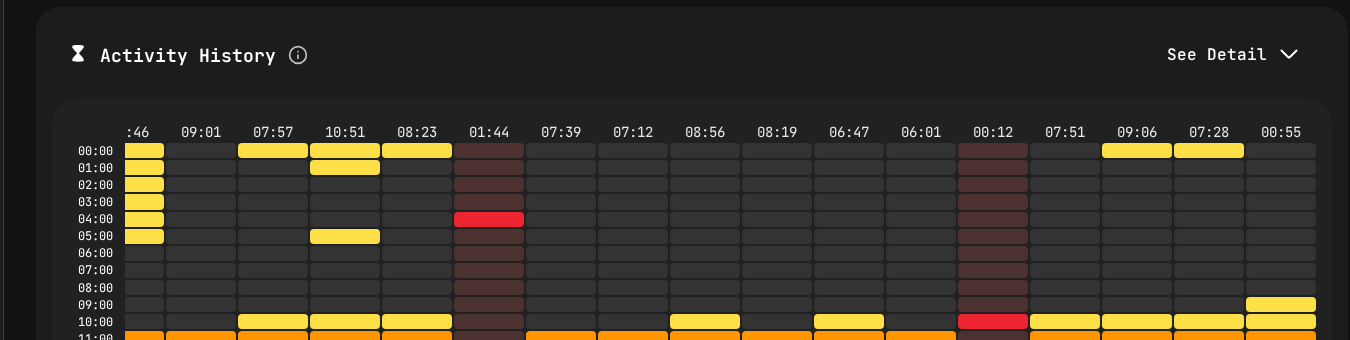
Coding session patterns tracked through IDE heartbeats.
Explanation 2: The AI Flow State
Cursor's inline AI suggestions and chat integration can reduce friction in common tasks: writing boilerplate, looking up API signatures, generating test cases, understanding unfamiliar code. If AI assistance removes micro-interruptions, developers may sustain longer coding sessions without reaching for a browser or documentation.
Our data shows that Cursor users tend to have longer average session lengths compared to VS Code users — suggesting fewer interruptions or context switches during coding.
Explanation 3: New Workflow Patterns
AI-native editors create new workflow patterns. Instead of:
- Write code → hit a problem → search Stack Overflow → return to editor
Cursor users do:
- Write code → hit a problem → ask Cursor → continue coding
This "stay in the editor" pattern could explain both longer sessions and higher total hours.
The Likely Reality
All three factors probably contribute. Self-selection inflates the number somewhat, but the magnitude of the difference (65% more hours per user) is too large to attribute entirely to selection bias. Something about the AI-assisted workflow is keeping developers in their editors longer.
What 24 Cursor Users in B2B Tells Us
The fact that 24 professional developers at B2B companies — not students, not hobbyists, not tech influencers — are using Cursor as their primary IDE is itself significant.
Consider the barriers to adopting a new IDE in a corporate environment:
- IT approval for new software
- Learning curve and temporary productivity loss
- Team standardization pressure ("everyone uses VS Code")
- License costs
- Plugin compatibility concerns
That 24 developers overcame these barriers suggests Cursor is delivering enough value to justify the switching cost.
The Adoption Curve
Based on the technology adoption lifecycle, 24 out of ~150 total IDE users (across all tools) puts Cursor in the early adopter phase — past the innovator stage but not yet mainstream. If the adoption curve follows typical patterns, we could see Cursor usage double or triple within the next 12 months as word-of-mouth spreads within organizations.
AI Extensions vs AI-Native: Does It Matter?
Many VS Code users also have AI extensions installed — GitHub Copilot, Codeium, Tabnine, and others. Our data doesn't distinguish between VS Code with and without AI extensions. But the fact that Cursor users show different patterns than VS Code users (even those who likely have Copilot installed) suggests that native AI integration matters more than bolt-on AI.
Why? Because Cursor was designed from the ground up around AI interaction. The AI isn't an extension that adds suggestions — it's a core part of the editing experience. Tab completion, inline chat, multi-file understanding, and codebase-aware suggestions are deeply integrated rather than layered on top.
This has implications for the IDE market: VS Code's extension model may not be sufficient to compete with natively AI-integrated editors in the long run.
The Productivity Question
Every engineering leader wants to know: does AI-assisted coding make my team faster?
Based on our data and industry research, here's an honest assessment:
Where AI Copilots Clearly Help
- Boilerplate generation: Standard patterns, CRUD operations, type definitions
- API exploration: Understanding unfamiliar libraries without leaving the editor
- Test generation: Creating test scaffolding and basic test cases
- Language translation: Porting patterns from one language to another
- Documentation: Generating docstrings and comments
Where AI Copilots Are Neutral or Negative
- Complex architecture decisions: AI suggestions follow patterns, not strategic thinking
- Novel algorithms: AI can't write what hasn't been trained on
- Debugging subtle issues: AI suggestions can mask root causes
- Security-critical code: AI may suggest insecure patterns that look correct
- Domain-specific logic: Business rules require context AI doesn't have
The Net Effect
For typical B2B development work — which involves a significant amount of boilerplate, API integration, and standard patterns — AI copilots likely deliver a ~10-25% productivity improvement for experienced developers. This aligns with findings from McKinsey's research on AI-augmented software development, which reported ~20-45% time savings on specific coding tasks (though net productivity gains were lower). For juniors, the improvement may be higher (more boilerplate assistance) but carries a risk of reduced learning.
Implications for Engineering Leaders
1. Don't Ban AI Tools
Some organizations restrict AI coding tools due to security or IP concerns. This is increasingly a competitive disadvantage. Developers at companies with AI access will outproduce those without it. Address the concerns (data handling, code review of AI-generated code) rather than blocking the tool.
2. Measure the Impact, Don't Assume It
Track coding patterns before and after AI tool adoption. PanDev Metrics can show you whether session lengths change, whether total coding hours shift, and whether weekly patterns evolve. Measure, don't guess.
3. Budget for AI IDEs
If Cursor licenses cost $20/month per developer and deliver even a 5% productivity improvement for a developer who costs $150K/year, the ROI is enormous. $240/year for $7,500 in productivity gains. The math is straightforward.
4. Set Quality Guardrails
AI-generated code still needs review. Establish clear expectations:
- All AI-generated code goes through standard code review
- Security-sensitive sections require manual review regardless of generation method
- Test coverage requirements don't change because code was AI-generated
- Developers must understand code they commit, whether they wrote it or AI suggested it
5. Watch for Over-Reliance
Junior developers using AI copilots may accept suggestions without fully understanding them. This creates a learning debt that becomes visible when they need to debug or extend the code later. Balance AI assistance with deliberate learning opportunities.
The Broader Trend
Forbes Kazakhstan reports that within teams using engineering intelligence platforms, the impact of AI copilots becomes measurable: "one developer writes 30% of their code with AI assistance, while another writes 70%" — highlighting the need to track AI's real effect on individual workflows rather than assuming uniform adoption. — Forbes Kazakhstan, April 2026
The shift from "developer writes every line" to "developer guides AI to write many lines" is the most significant change in software development since the move from on-premise to cloud. GitHub Octoverse data already shows that AI-generated code suggestions account for a growing share of accepted pull request content. Our data from 100+ B2B companies shows this shift is already happening in production environments — not just in demos and blog posts.
The 24 Cursor users in our dataset today will be 100+ within a year, as AI-native tooling becomes the expected standard. Engineering leaders who invest in understanding and measuring this transition now will be better positioned than those who wait.
Conclusion
AI copilots are changing how developers work. Cursor users in our data log 65% more hours per person than VS Code users, likely driven by a combination of self-selection and genuine workflow improvements. The AI-native IDE is moving from experiment to production tool.
The smart response isn't hype or fear. It's measurement. Track how AI tools change your team's patterns, invest in the ones that demonstrate real impact, and maintain quality standards regardless of how the code was generated.
Track how AI tools affect your team's coding patterns. PanDev Metrics shows IDE usage, session lengths, and productivity trends — so you can measure the AI copilot effect in your own organization.