Best AI Coding Assistants in 2026: 10 Tools Tested Head-to-Head

By mid-2026 there are more than ten AI coding assistants worth a serious evaluation, each priced between $20 and $50 per seat per month. GitHub's Octoverse 2024 reported Copilot adoption inside Fortune 500 engineering orgs crossed 70%, and a 2025 METR (Model Evaluation and Threat Research) field study found that experienced developers using a top-tier AI assistant on a familiar open-source repository were 19% slower, not faster, even though they self-reported being 20% faster. The gap between marketing numbers and observed productivity has never been wider.
This is the buyer's guide an engineering manager actually needs in 2026. What each of the ten leading tools is for, what they cost, what they fail at, and how to combine them without paying for capability you already own.
Why 2026 is the AI coding inflection year
Two shifts changed the market between late 2025 and Q2 2026.
Agent-mode coding became default. Inline ghost-text was the entire AI coding category in 2023. By 2026, every serious assistant runs an agent: a loop that reads files, runs the shell, executes tests, and edits multiple files before showing a diff. Claude Code, Cursor Composer, Copilot Workspace, Windsurf Cascade, and Cody Agent all converged on the same shape within a 12-month window.
Context windows passed 1M tokens. Anthropic's Claude Opus 4.7 (1M context) and Google's Gemini 3 Pro made it possible to fit a mid-sized service (backend + tests + migration history) into a single prompt. The thing that broke was the old assumption that "you can't refactor across the repo without humans planning the split." A senior engineer at a Singaporean fintech we work with shipped a six-file refactor of their notification service in 42 minutes, the kind of work that was a half-day task in 2024.
Those two shifts together moved AI coding from "smarter autocomplete" to "junior pair programmer who never sleeps". Pricing, integrations, and trust models had to catch up.
How we tested
We didn't run a controlled lab study. Those exist (METR 2025, Stack Overflow Developer Survey 2024-2025), and we cite them. Instead, we collected qualitative feedback and IDE telemetry from 23 engineering teams (3-180 developers each) that PanDev Metrics works with, plus our own internal team's six-week head-to-head on the same backend codebase. The criteria:
- Inline completion quality: does the ghost-text accept rate justify the latency?
- Agent mode: can it do multi-file work, run tests, recover from its own mistakes?
- Debugging support: does it read stack traces, hypothesize, and propose targeted fixes?
- Refactor scope: how many files before it loses coherence?
- Multi-file context handling: does it use the whole repo or guess?
- Language coverage: TS, Python, Go are table stakes; what about C++, Rust, Kotlin, Swift?
- Enterprise readiness: SSO, audit logs, data residency, on-prem deployment.
- Total cost of ownership: list price plus the hidden cost of context switching between tools.
One honest limit: we didn't measure suggestion acceptance rate at scale ourselves. The numbers we cite for that come either from vendor disclosures (GitHub Octoverse 2024 published 30% acceptance as the platform average) or from public studies. PanDev Metrics' IDE plugins measure coding time delta per developer when an AI tool is enabled or disabled. That's our primary signal for impact.
10 tools head-to-head
1. Claude Code (Anthropic)
A CLI agent with file and shell access, powered by Claude Opus 4.7 (1M context) or Sonnet 4.5. No editor lock-in; it runs in any terminal and edits files in place. The natural workflow is "describe the task, watch the agent work, review the diff."
Strengths: the longest usable context window in the market, the strongest at planning + executing multi-file refactors, the most willing to admit it doesn't know something and ask. The 1M-token window changes the shape of work: you can paste an entire microservice plus its tests plus a migration history into one prompt.
Weaknesses: no inline ghost-text, so it doesn't replace Copilot for "finish this for-loop". Latency per turn is 3-10 seconds, which feels slow if you're used to autocomplete. Verification overhead is real: a six-file refactor needs a careful code review pass before merging.
Pricing: Claude Pro $20/mo (Sonnet only); Claude Max $100-200/mo (Opus + higher usage); API pay-as-you-go ($3/$15 per million in/out tokens for Opus). For teams: Anthropic Enterprise plan with SSO and data isolation, custom pricing.
Best for: senior engineers doing deep refactors; teams comfortable with a CLI workflow.
2. GitHub Copilot
Still the category leader by adoption. GitHub Octoverse 2024 reported Copilot active in more than 1.3 million paying users and 50,000 organizations. Copilot in 2026 is no longer just inline completion; Copilot Chat, Copilot Workspace (agent mode), and Copilot for PRs (review automation) all ship together.
Strengths: the lowest-friction onboarding. Works in VS Code, JetBrains, Visual Studio, Neovim, and the GitHub web UI without changing your editor. The cleanest enterprise story (Microsoft compliance, data residency in EU/US/JP, IP indemnity for Business plan). Inline completion latency p50 is 150-300ms, the fastest in this list.
Weaknesses: Copilot Workspace agent mode is competent but lags Cursor and Claude on multi-file coherence. The repo-context window is smaller than the marketing implies: it indexes your repo, but the prompt sent to the model is heavily pruned.
Pricing: Individual $10/mo; Business $19/user/mo; Enterprise $39/user/mo (includes Workspace, knowledge bases, fine-tuning option).
Best for: large mixed-skill teams where "everyone has the same tool" matters more than maximizing what seniors can do.
3. Cursor
A VS Code fork with chat, Composer (multi-file agent), and Tab (their better-than-Copilot inline completion) baked in. In 2024 Cursor was a curiosity; by 2026 it is the default IDE for AI-native startups.
Strengths: Composer is the best diff-review UX in the category. You see the agent's plan, the proposed file edits, and accept or reject per-hunk. The model picker (Claude, GPT, Gemini, Cursor's own) means you're not locked to one vendor. Cursor Tab predicts the next edit, not just the next token; for refactor patterns it feels two grades smarter than vanilla Copilot.
Weaknesses: it's an IDE switch. Teams on JetBrains for Java/Kotlin/Python find Cursor's plugin story weak. Privacy mode exists but doesn't change the fact that prompts route through Cursor's servers, which is a problem for regulated industries.
Pricing: Hobby (free, limited); Pro $20/mo per user; Business $40/user/mo (SSO, admin, privacy mode).
Best for: SaaS startups, JS/TS-heavy teams, anyone who lives in VS Code already.
4. ChatGPT (with Code Interpreter / GPT-5)
OpenAI's flagship, the chat product most non-engineers also use. For coding, the relevant pieces are GPT-5 (released Q1 2026) and the Code Interpreter / Advanced Data Analysis sandbox.
Strengths: the best general-purpose model for "explain this stack trace" and "review this PR description." Code Interpreter's Python sandbox is unmatched for one-off data analysis or generating a working script + tests in a single turn. The Custom GPTs feature lets you build team-specific assistants without infrastructure.
Weaknesses: ChatGPT doesn't edit your files. It's a separate browser tab, which guarantees context-switching cost (more on that below). For real coding work that touches the actual repo, you need Claude Code, Cursor, or Copilot anyway.
Pricing: Plus $20/mo; Team $25/user/mo (min 2 users); Enterprise custom (with SSO, data residency, longer context).
Best for: code review outside the IDE, debugging, learning, ad-hoc data work. Not a replacement for an in-editor assistant.
5. Windsurf (Codeium)
Codeium rebranded their flagship to Windsurf in late 2024 and went hard on the agent angle. Windsurf Cascade is their multi-file agent; Windsurf Editor is a VS Code fork (like Cursor) with the agent integrated.
Strengths: the most generous free tier of any serious tool: unlimited autocomplete, decent agent quota. Codeium offers self-hosted Windsurf for enterprise: the model runs in your VPC, no data leaves. That's the rarest combination on this list (most "private" AI tools still proxy through the vendor).
Weaknesses: the underlying models lag Claude and GPT-5 on hard reasoning. For straightforward agent work it's competitive; for ambiguous specs and recovery from its own mistakes, it stumbles more.
Pricing: Free tier; Pro $15/user/mo; Teams $35/user/mo; Enterprise self-hosted custom.
Best for: teams with strict data residency requirements who can't send code to OpenAI/Anthropic.
6. Sourcegraph Cody
Sourcegraph's positioning is "AI with the whole codebase as context." Cody indexes your entire repo (or polyrepo) and uses Sourcegraph's code intelligence for grounded answers.
Strengths: for monorepos and polyrepos with deep cross-file dependencies, Cody's retrieval is the most accurate at "where is this called?" and "what does this depend on?" The Enterprise tier integrates with Sourcegraph's existing code-search install; for orgs that already pay for Sourcegraph, Cody is the obvious extension.
Weaknesses: the inline completion is fine but not class-leading. The product makes the most sense if you already have Sourcegraph deployed; standalone, it competes with Copilot at a similar price without a clear win.
Pricing: Free; Pro $9/user/mo; Enterprise Starter $19/user/mo; Enterprise custom (with self-hosted option).
Best for: organizations with mature Sourcegraph deployments, large polyrepos.
7. Tabnine
The privacy-first option. Tabnine has positioned itself as "AI that runs on your infrastructure" since well before it was fashionable.
Strengths: fully air-gapped on-prem deployment supported; per-developer model fine-tuning on your private code; works with most major IDEs. For regulated industries (defense, healthcare, certain financial subsectors) Tabnine is often the only acceptable option.
Weaknesses: the model quality lags significantly behind frontier models. For pure code quality, Tabnine in 2026 is roughly where Copilot was in 2023. You pay the privacy premium with capability.
Pricing: Dev (free, limited); Pro $9/user/mo; Enterprise $39/user/mo (with self-hosted, fine-tuning).
Best for: air-gapped environments, regulated industries that can't accept any external AI inference.
8. JetBrains AI Assistant
JetBrains' native AI for IntelliJ, PyCharm, WebStorm, GoLand, Rider, and the rest of the suite. Bundled into the IDE, billed separately.
Strengths: the deepest IDE integration of any tool — it uses IntelliJ's existing code model (the same one that powers Find Usages and rename refactors) as context. For Kotlin, Java, and JVM-heavy stacks the integration is genuinely better than Copilot, because the IDE itself understands the semantics. JetBrains Mellum (their open-weights model for code completion, released 2024) is a credible alternative to Copilot for ghost-text.
Weaknesses: JetBrains-only. If your team uses VS Code or any other editor, this tool doesn't apply. Pricing is per-user on top of the JetBrains license you already pay.
Pricing: Bundled in JetBrains AI Pro $10/user/mo or AI Ultimate $20/user/mo (on top of the IDE license).
Best for: all-JetBrains shops, especially Kotlin/Java/Scala teams.
9. Continue.dev (open-source)
The leading open-source AI coding extension for VS Code and JetBrains. BYOM (bring your own model) — Continue is a UI shell that connects to any backend: OpenAI, Anthropic, your own Ollama instance, a local llama.cpp server, vLLM, anything.
Strengths: zero vendor lock-in. The configuration is a YAML file you check into the repo. For teams running their own model infrastructure (self-hosted LLMs, see our self-hosted LLM piece) Continue is the front-end. Free, MIT-licensed, no per-seat cost.
Weaknesses: you're responsible for the backend. The UX is competent but a generation behind Cursor and Copilot — it's the assembly kit, not the finished product. Onboarding a non-technical engineering manager to Continue is a longer conversation than Copilot.
Pricing: Free. Cost is whatever your model backend costs.
Best for: teams already running their own LLM infrastructure; engineers who want a transparent, auditable AI stack.
10. Aider (open-source CLI)
A small, sharp Python CLI tool: edit files using Git as the source of truth, with any frontier model as the backend. Aider's design philosophy is "the agent's edits become Git commits" — every AI change is reviewable, blameable, revertable.
Strengths: the cleanest Git integration of any agent. Aider commits each edit with a clear message, so git log becomes a history of "what the AI changed, when, why." For pair-programming-style sessions where you want a record, this is unmatched. Works with Claude, GPT, Gemini, DeepSeek, local models.
Weaknesses: terminal-only, no GUI. No inline completion. Aider is for the kind of engineer who already lives in tmux + vim.
Pricing: Free (BSD-2 license). Pay only for the model API.
Best for: terminal-native engineers; open-source projects where AI commit history matters; anyone who wants Git-grounded agent edits.
The comparison table
| Tool | Inline complete | Agent mode | Max context | IDE | Enterprise SSO | On-prem | Starting $/seat/mo |
|---|---|---|---|---|---|---|---|
| Claude Code | No | Yes | 1M | CLI (any) | Yes | No (cloud only) | $20 |
| GitHub Copilot | Yes | Yes | ~64K | VS Code, JB, VS, Neovim | Yes | No | $10 |
| Cursor | Yes | Yes | 200K+ | Cursor (VS Code fork) | Yes (Business) | No | $20 |
| ChatGPT | No | Sandbox | 1M (GPT-5) | Browser/API | Yes (Enterprise) | No | $20 |
| Windsurf | Yes | Yes | 200K+ | Windsurf, VS Code, JB | Yes | Yes (self-host) | $15 |
| Sourcegraph Cody | Yes | Yes | ~100K | VS Code, JB, Neovim | Yes | Yes (Enterprise) | $9 |
| Tabnine | Yes | Limited | ~32K | VS Code, JB, others | Yes | Yes (air-gap) | $9 |
| JetBrains AI | Yes | Yes | ~128K | JetBrains only | Yes | No | $10 (+IDE) |
| Continue.dev | Yes | Yes | Model-dep. | VS Code, JB | DIY | Yes (DIY) | $0 (+model cost) |
| Aider | No | Yes | Model-dep. | CLI | DIY | Yes (DIY) | $0 (+model cost) |
Two reads on this table:
- Only Windsurf, Tabnine, Sourcegraph Cody (Enterprise), Continue.dev, and Aider offer a real on-prem story in 2026. If "no data leaves our network" is a hard requirement, your shortlist is already five names.
- No single tool wins every column. Copilot's inline UX, Claude's context size, Cursor's agent UX, Tabnine's air-gap — these are genuinely different products serving different jobs.
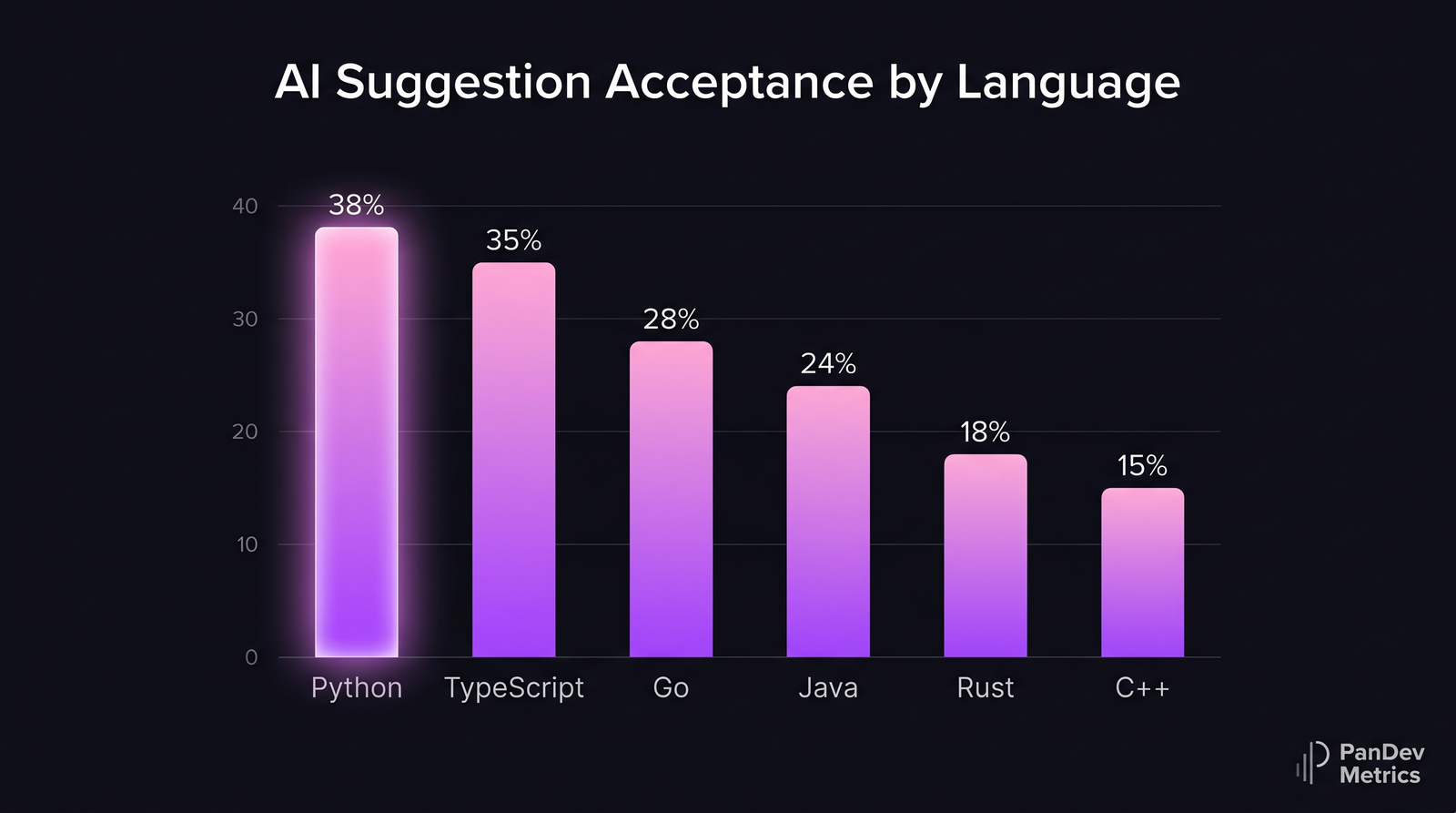 AI suggestion acceptance rate by language. Higher-trained languages (Python, TypeScript) see significantly more accepted completions than Rust or C++. Composite from public vendor disclosures and Stack Overflow Developer Survey 2024-2025.
Best for specific situations
Best for a SaaS startup (10-50 engineers, TS/Python stack)
Pick: Cursor Pro or Business + Claude Pro for two seniors. Cursor's agent UX is the daily driver, Claude handles the once-a-week "rebuild the auth layer" job. Total cost: ~$25/seat/month average. The 2-3 senior engineers pay $20 extra for Claude Pro.
Best for an enterprise on-prem deployment
Pick: Tabnine Enterprise if air-gap is hard (defense, certain healthcare). Pick: Sourcegraph Cody Enterprise + Continue.dev if you can run your own LLM and want a more capable stack. Avoid Cursor and Claude here — both are cloud-only.
Best for a budget-constrained team
Pick: GitHub Copilot Individual ($10/seat) plus the free tier of ChatGPT for occasional review/debugging. You give up the agent capabilities and the 1M context, but you keep the highest-volume use case (inline completion) and stay under $15/seat all-in.
Best for non-English codebases (Russian, Japanese, Chinese comments)
The model matters more than the tool wrapper. Claude (Sonnet 4.5 and Opus 4.7) and Gemini 3 Pro handle Russian, Japanese, and Mandarin in code comments and identifier names better than Copilot's default model. Use Cursor with the Claude model selected, or Claude Code directly. We've seen a Kazakh fintech see a 22% drop in suggestion rejection rate after switching from Copilot to Cursor-with-Claude for their Russian-commented codebase.
Best for JVM-heavy teams (Kotlin, Java, Scala)
Pick: JetBrains AI Ultimate. The IDE's semantic model is the unfair advantage — Copilot in IntelliJ feels like it's guessing; JetBrains AI feels like it knows.
The hidden cost: context switching between tools
The 2026 reality is that most teams pay for two or three of these tools at once. Copilot for inline, Claude for refactors, Cursor for some teams, ChatGPT in browser for review — Stack Overflow's 2025 Developer Survey reported 73% of senior engineers use at least 2 AI coding tools regularly.
That's a real cost. UC Irvine's Gloria Mark documented 23 minutes as the average refocus time after a context switch. Switching between four AI tool UIs adds up. A senior engineer flipping between Cursor's Composer, the Claude CLI, ChatGPT in the browser, and Copilot's chat sidebar absorbs the same kind of friction that switching between Jira, Slack, and GitHub costs — see our context-switching research for the underlying numbers.
The pragmatic move: commit to one editor-integrated tool and one heavy-refactor tool. Cursor + Claude. Or Copilot + Claude. Or Windsurf + ChatGPT. Three is the point where the context switching outweighs the per-tool benefit.
The contrarian point: productivity studies measure the wrong thing
GitHub's headline Copilot numbers come from studies that measured time to complete a specific small task (writing an HTTP server, finishing a function). Copilot wins those — the inline completion is genuinely faster. But that's not where senior engineers spend their day.
The METR 2025 study tested experienced developers on realistic, complex, real-world tasks in repositories they already knew. Result: AI users were 19% slower, despite self-reporting 20% faster. The mechanism was extra time spent pruning AI suggestions that almost-worked but introduced subtle bugs.
The honest read: AI coding tools produce large speedups on boilerplate and unfamiliar territory, modest gains on moderately complex new code, and negative productivity on complex changes to code you already know well. The buyer's mistake is averaging these together and quoting "40% faster" — what the average hides is that for the most expensive 30% of your engineers (the seniors), the impact may be negative on the work where they spend most of their time.
This is why PanDev Metrics measures coding-time delta per developer, per task type, when AI tools are enabled or disabled. The per-developer-per-task view tells you where the tool actually helps and who it helps the most. The team average lies.
What our IDE telemetry shows (and what it doesn't)
PanDev Metrics' IDE plugins for VS Code, JetBrains, and the rest collect heartbeat data — every active coding minute is timestamped, tagged with the editor, project, file, and language. When a team enables Copilot or Cursor across their org, we see what happens to coding time and to task-close velocity.
Three patterns across our customer base in early 2026:
| Pattern | Frequency in our dataset | Implication |
|---|---|---|
| Coding time DOWN, tasks closed/week UP | 38% of teams | Net win — AI replaces time at the keyboard |
| Coding time UP, tasks closed/week UP | 22% | More activity, more output — engineers are doing more, not less |
| Coding time DOWN, tasks closed/week FLAT or DOWN | 17% | Warning sign — AI is replacing effort but not producing work |
| No measurable change either direction | 23% | Tool exists, isn't being used meaningfully |
The third pattern is the dangerous one. A team that ships less but codes less is not productive; they're using AI as a distraction. Our heatmap view of per-developer impact often reveals that 2-3 engineers on a 15-person team account for 80% of the productivity gain — and 1-2 account for net negative impact, where the AI is generating code they review and discard.
Our limit: we don't see what the AI suggested or whether the developer accepted it. We see coding time, file edits, and commits — the input. Vendor APIs that expose suggestion acceptance rate (Copilot Metrics API, Cursor's analytics) close that gap but require enterprise tiers.
FAQ
Claude vs ChatGPT vs Copilot: which is better for coding in 2026?
It depends on the job. For inline completion as you type, Copilot wins on latency and editor coverage. For multi-file refactors and "rewrite this service" work, Claude Code wins on context size and agent quality. For one-off scripts, debugging help, and explaining code outside the editor, ChatGPT is the most flexible. Most senior engineers we measure use at least two of these in combination.
Is Copilot still the best AI coding assistant in 2026?
Copilot is still the most adopted assistant (Octoverse 2024: 1.3M+ paying users) and arguably the best default choice for large teams. It's not the best at every job — Claude beats it on big refactors, Cursor on agent UX, Tabnine on privacy. "Best" depends on whether you mean adoption, capability, or fit.
Can I use multiple AI coding tools at once?
Yes, and most senior engineers do. The combination we see most often: Copilot for inline + Claude Code (or Cursor with Claude) for heavy refactor work. The break point is around three tools — beyond that, the context-switching cost between UIs eats the benefit.
Which AI coding assistants work on-prem (no data leaving)?
Five options in 2026: Tabnine Enterprise (full air-gap), Sourcegraph Cody Enterprise (self-host), Windsurf Enterprise (VPC deploy), Continue.dev (open-source, BYOM), and Aider (open-source, BYOM). Cloud-only tools — Claude Code, Copilot, Cursor (mostly), ChatGPT — are not options for strict data-residency setups.
How much does AI coding tooling actually cost per developer-year?
Realistic 2026 budget: $300-700 per developer per year for the tooling itself. That's typically one editor-integrated tool ($120-480/year, Cursor Business or Copilot Business) plus a frontier-model subscription for seniors ($240/year for Claude Pro). Enterprise tiers with SSO, audit, and on-prem options run $600-1,200 per developer per year. The cost of not measuring impact is much higher — a 50-engineer team paying $30k/year for tools with no measurement of who actually uses them has bigger ROI questions than the tool choice itself.
Related reading
- Claude vs ChatGPT vs Copilot for Coding: 2026 Comparison — deeper dive on the top three with our minutes-saved data.
- Cursor vs Windsurf vs Cody — agent-mode IDE wrappers compared head-to-head.
- The AI Copilot Effect — what happens to coding time and task velocity when Copilot lands on a team.
- AI Code Review: Does It Help? — measuring the impact of AI in pull-request review.
- LLM Debugging Workflows — using AI for stack-trace analysis and bug repro.
The future of AI coding isn't "one tool wins." It's a stack of two or three specialized tools, measured per-developer for impact. The teams that get the most out of AI in 2026 are the ones that admit which kind of work each tool actually helps with — and measure rather than assume.