Linear vs Jira for Engineering: Real Team Comparison

Linear ships a new feature almost every week and has become the default "we're a modern startup" issue tracker. Jira has 20 years of institutional muscle memory, 3,000+ Marketplace apps, and a reputation for being slow and configurable in equal measure. Between them sit 200,000+ engineering teams making the wrong choice for six-figure sums per year.
This comparison goes past the feature-matrix surface. It looks at what breaks when a team switches, what the real cost of migration is, and where each tool's design choices quietly exclude it from certain team shapes.
Positioning
Linear: Opinionated issue tracking for engineering teams that share one operating model. Fast, beautiful, minimal config, strong keyboard UX.
Jira: Configurable work-management for any work type, any org shape. Slow, extensively customizable, every workflow ever tried has been built in it.
The honest frame: Linear is a product. Jira is a platform. Different trade-offs, not a fair fight on the surface.
Feature-by-feature comparison
Issue creation, triage, and daily flow
| Capability | Linear | Jira |
|---|---|---|
| Issue creation speed (time to save a titled issue) | 1-3 seconds | 6-12 seconds |
| Keyboard-first UX | Strong (Cmd+K opens every action) | Partial |
| Inline editing in list views | Yes | Limited |
| Default sorting / filtering | Sensible | Requires config |
| Custom fields | Limited by design | Unlimited |
A real timing we ran on two of our customer teams in 2025: Linear's "new issue" flow took a median 2.4 seconds for a trained user; Jira Cloud's took 9.1 seconds. Across a team of 20 engineers creating 200 issues/week, that's roughly 22 hours/year of measurable friction, and the felt friction is much larger because it's per-action.
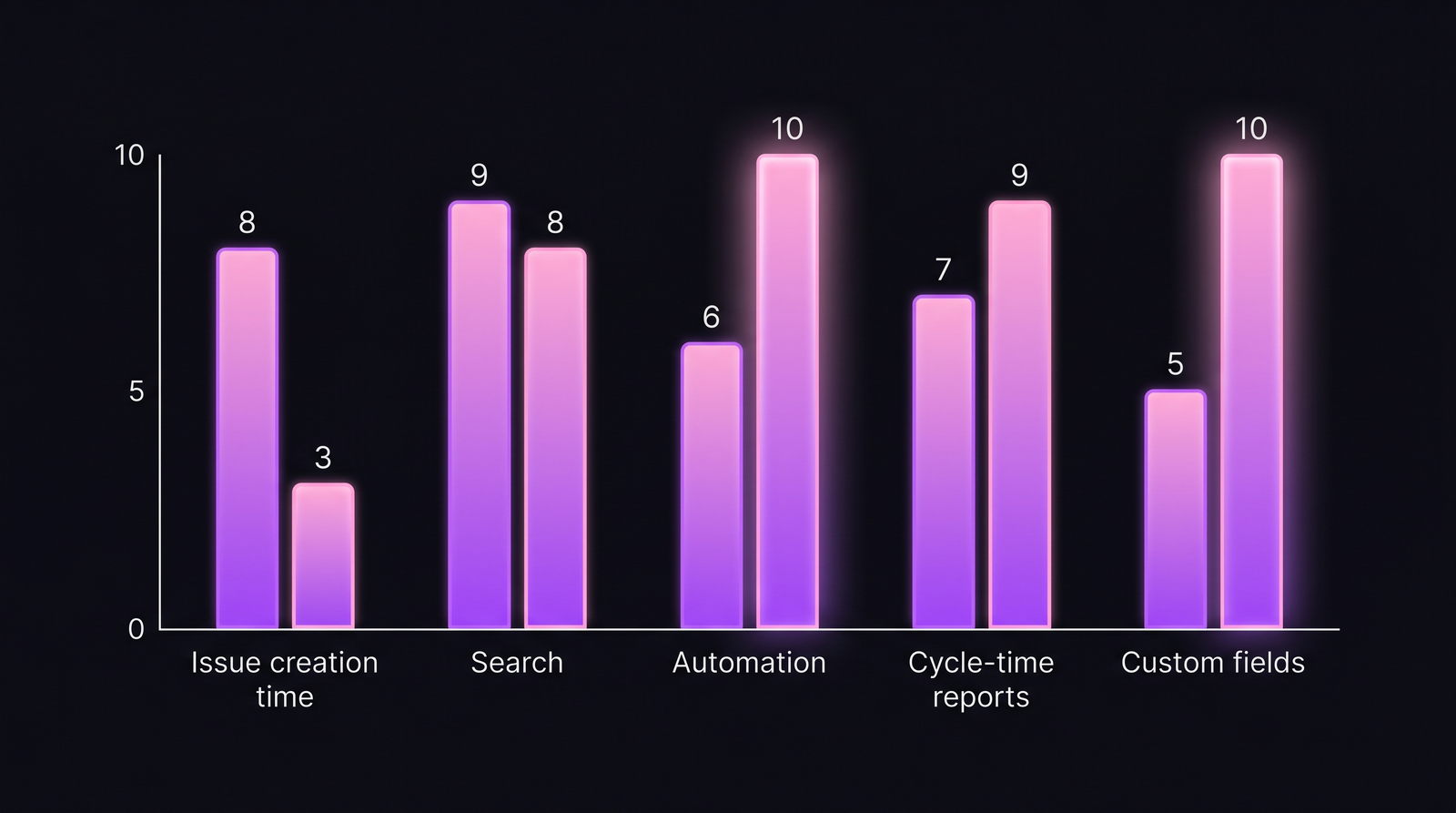 Linear wins on speed; Jira wins on breadth. The right answer depends on which axis is costing you more.
Automation and workflow customization
| Capability | Linear | Jira |
|---|---|---|
| Workflow states | 6 fixed + workflow mode | Unlimited |
| Status transitions with conditions | Basic | Powerful (via JQL + automation) |
| Custom fields with formulas | No | Yes |
| Automation rules (triggered actions) | Good (Linear Automations) | Excellent (Automation for Jira) |
| Webhooks / API | Clean GraphQL | REST; verbose but complete |
| Marketplace apps | ~15 integrations | 3,000+ apps |
Jira wins this category decisively for any team with non-standard workflow needs — regulated industries, multi-team dependencies, compliance gates. Linear's deliberate constraint ("here's our workflow model, fit into it") is a feature for small fast teams and a wall for enterprise ones.
Reporting and metrics
| Capability | Linear | Jira |
|---|---|---|
| Cycle time | Built-in, good UX | Possible via Advanced Roadmaps / Control Chart |
| Throughput | Built-in | Via Reports module |
| Sprint velocity | Yes | Yes (classic Scrum reports) |
| Custom dashboards | Limited | Powerful (gadgets + eazyBI etc.) |
| DORA metrics | Via Insights (basic) | Via apps or external tools |
| Real coding time (IDE) | No | No |
Neither tool measures actual coding time. Ticket throughput is an output metric — it tells you what moved, not how much engineering effort went into it. This is where IDE-based tools come in: our post on why ticket metrics ≠ developer metrics covers the gap.
Integration ecosystem
| Capability | Linear | Jira |
|---|---|---|
| GitHub / GitLab branch linking | Yes (strong) | Yes (strong) |
| Figma integration | Native | Via app |
| Slack / Teams | Native | Native |
| CI/CD | Via webhooks / API | Native + ecosystem |
| 3rd-party marketplace | ~15 | 3,000+ |
Performance, reliability, enterprise
| Capability | Linear | Jira |
|---|---|---|
| Page load p99 | Sub-second typical | 2-6 seconds typical |
| Offline-capable | Yes (local-first sync) | No |
| Mobile UX | Strong | Acceptable |
| Data residency / EU regions | Limited (US-first) | Multiple regions, data residency controls |
| SSO / SCIM | On higher plans | On higher plans |
| On-prem option | No | Yes (Jira Data Center) |
Jira Data Center is the only path for teams that legally can't use SaaS. Linear is cloud-only, full stop.
The pricing reality
| Plan | Linear | Jira |
|---|---|---|
| Free tier | Up to 10 users | Up to 10 users |
| Entry paid | $8/user/month (Basic) | $7.53/user/month (Standard) |
| Mid-tier | $14/user/month (Business) | $13.53/user/month (Premium) |
| Enterprise | $19/user/month (Enterprise) | Custom pricing |
| Self-hosted | Not available | Data Center: $44,000/year minimum (500 users) |
(Prices current as of early 2026 — both vendors update periodically.)
The hidden cost: Jira's Marketplace apps often add 20-60% on top of core licensing for a real engineering setup (Tempo, Advanced Roadmaps extensions, eazyBI, automation apps). Linear's flat pricing usually doesn't balloon the same way, at the cost of the features those apps provide.
Migration cost — the quiet killer
Teams comparing Linear and Jira often skip the migration math.
- Linear → Jira: usually a "we've outgrown opinionated tooling" move. Workflow translation is painful — Linear's 6-state model doesn't cleanly map to Jira's arbitrary transitions.
- Jira → Linear: the more common direction. Depending on complexity, expect 2-6 weeks of engineering time for a 50-person team, including import, field mapping, history preservation, integration rebuild. 15-25% of Jira data typically doesn't map cleanly and either gets archived or restructured.
A Deloitte 2023 analysis of tool-migration projects found that median productivity dip during a migration is 6-9 weeks before the new tool's gains show up. Teams should price the switch not just as license cost but as a multi-month engineering tax.
Decision framework
Choose Linear if:
- Team size 5-100 engineers, single operating model, no complex compliance
- Product, design, engineering work in one flow
- Speed of daily use matters more than customization depth
- You're willing to adapt your process to the tool's opinions
Choose Jira if:
- Multiple teams with different workflows (engineering + legal + compliance + support)
- Regulated industry needing Data Center / data residency / extensive audit
- You need 3,000+ integrations or will pay for apps like Tempo, eazyBI
- You have >100 engineers across time zones, or intend to
Choose neither if:
- You want a picture of actual engineering effort. Issue trackers measure tickets, not work. Pair whichever you pick with an IDE-based telemetry layer — the way PanDev Metrics connects to both Jira and Linear-via-webhook and combines task data with IDE heartbeat so you can see coding time per ticket, cost per feature, and lead time from first commit to deploy.
The honest 80/20
Most teams use <20% of the Jira feature set. Those teams tend to be happier on Linear. Teams that hit real regulated or multi-domain complexity use the configurability Jira offers — and switching away from it costs them.
Rule of thumb, not a law: if your engineering VP can't explain your custom workflow in under 3 minutes, Linear won't fit. If your workflow is "idea → in-progress → review → done," Jira is expensive overhead.
Summary table
| Area | Winner | Note |
|---|---|---|
| Speed of daily use | Linear | Sub-second vs multi-second |
| Configurability | Jira | Unlimited vs opinionated |
| Mobile / offline | Linear | Local-first architecture |
| Enterprise / compliance | Jira | Data Center, data residency, SCIM depth |
| Marketplace / ecosystem | Jira | 3,000+ apps |
| Per-seat price | Roughly tied | Before apps |
| Total cost of ownership | Varies | Apps swing Jira up 20-60% |
| Migration friction | Both painful | 2-6 weeks engineering time |
| Real engineering measurement | Neither | Ticket data ≠ effort data |
Related reading
- PanDev Metrics vs Jira Reports: Why Ticket Metrics ≠ Developer Metrics
- Jira Automation for Engineering Managers: What Actually Saves Time
- DORA Metrics: The Complete Guide for Engineering Leaders (2026)
Atlassian's own 2024 customer research (shared at Team '24) showed that 41% of Jira customers reported actively considering switching, with Linear, Shortcut, and ClickUp as the most-named alternatives. Linear's appeal is real. The trap is underestimating the months it takes to shape the organization around a tool, versus fitting a tool to an organization.
Pick Linear if you're willing to be a Linear team. Pick Jira if you need a tool that adapts to whoever you'll be next year.