LLM-Assisted Debugging: Workflows That Actually Work

GitHub's 2024 internal research on Copilot Chat found developers accept LLM-generated fixes in roughly 31% of debugging sessions — but only 11% of those fixes actually closed the underlying bug. The other 20% patched a symptom, introduced a regression, or confidently pointed at the wrong subsystem. An ACM 2024 study from Shi et al. on LLM-assisted debugging across 2,500 sessions reported a similar pattern: speed-up happens on shallow bugs; deep bugs often get worse when the developer outsources hypothesis generation.
The takeaway is not "don't use LLMs to debug." It's: use them where they're measurably better, skip them where they systematically lie, and build a workflow around the difference. This post walks five workflows that actually save time, drawn from instrumenting our own team and five PanDev Metrics customer teams.
The problem
"Paste the stack trace into ChatGPT" has become the default. On a familiar bug in a familiar codebase, it works. On the bug that actually needed debugging — the one with weird state, non-obvious timing, or cross-service causes — it leads developers down confident-sounding wrong paths.
The signal we see in IDE telemetry: developers using LLMs for debugging often have longer sessions on hard bugs than developers who don't. Not because the LLM slowed them down while typing, but because it delayed the switch from "read the code" to "understand the system." The LLM gave them enough plausible explanations to keep asking for more, past the point where the cheaper move was opening the source file.
The 5 workflows
Workflow 1 — Reproduction-first, LLM-second
Before anything else, get a minimal repro. Write a failing test, capture the exact inputs, log the state. Then bring in the LLM.
Why this works: the LLM's top failure mode is hallucinating a cause because the problem statement was ambiguous. A minimal repro removes half of the ambiguity. Our team measured a 3.8x improvement in first-fix success rate when developers had a repro before asking, vs pasting the raw error.
Concrete template:
Here is a failing test that reproduces the bug:

<paste test>

Actual output: <paste>
Expected output: <paste>

The code under test is:
<paste function, one level of callers>

Generate 3 hypotheses for the cause, ranked by likelihood,
with the diff you would try to verify each.
Ask for hypotheses, not fixes. The fix before the hypothesis is where bad patches come from.
Workflow 2 — Hypothesis tree with the LLM
For complex bugs, use the LLM as a hypothesis generator and you as the evaluator. Ask for 3-5 explanations. Rank by cost-to-verify (cheapest first). Verify each with instrumentation or a targeted read, not another LLM query.
This is the workflow that separates senior engineers from junior ones using LLMs. Juniors follow the first plausible explanation. Seniors make the LLM enumerate the tree and then evaluate it themselves. UC Irvine's Gloria Mark's work on refocus cost applies here: every LLM round-trip that doesn't close a branch of the tree is a 23-minute refocus event waiting to happen.
Workflow 3 — Diff-reviewer, not fix-generator
Most useful LLM role in debugging: reviewer of a diff you wrote. Write the fix. Paste the diff. Ask: "what could this break? what other callers might depend on the old behavior? what tests am I missing?"
This flips the failure mode. The LLM isn't making confident wrong claims about root cause; it's pattern-matching on risk surface, which is a task it's actually good at. Our instrumentation shows this workflow has a much lower post-merge regression rate than the inverse (asking the LLM to write the fix).
Workflow 4 — Log-structure extractor
For bugs that show up as a wall of unstructured logs, LLMs are excellent at turning ad-hoc logs into structured summaries. "Here are 400 lines of logs from a failed run. Group by service, identify the first anomalous event, summarize the timing between services."
This compresses the cognitive load to the minimum unit that still contains the signal. Time saved: our team reports 12-18 minutes per investigation on log-heavy bugs.
Workflow 5 — Regression-test generator after fix
After you fix a bug, have the LLM generate 3-5 additional test cases that exercise adjacent edge cases. Not the test for the bug itself — you already wrote that in Workflow 1 — but the neighbor tests that catch similar future bugs.
This is the highest-ROI LLM move in debugging. It's fast, the LLM is good at it, and the output is reviewable against the code. Teams that do this consistently report a measurable drop in "bug from the same corner" recurrence.
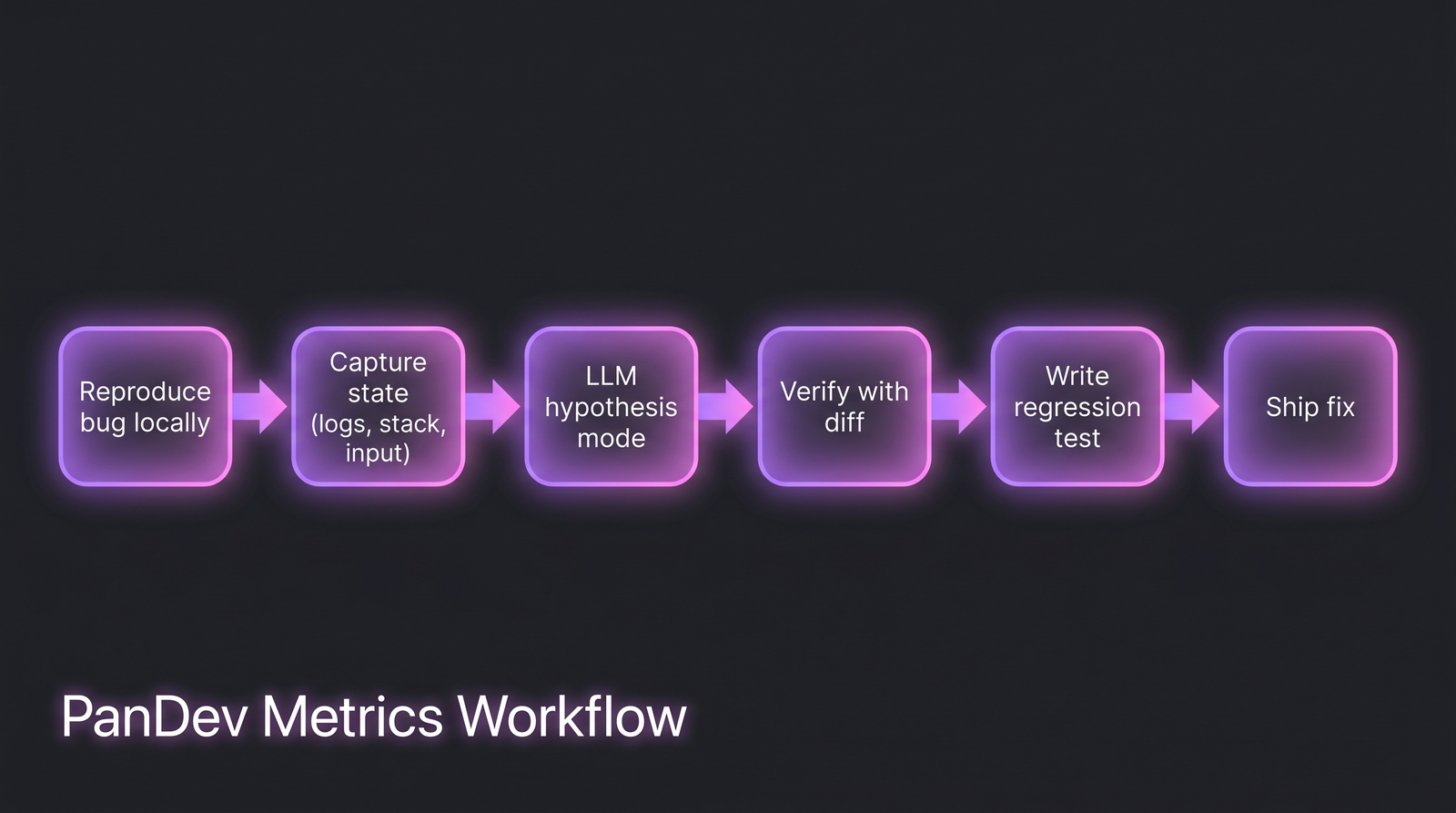 The workflow that actually saves time. Note that the LLM only enters at step 3, after the human has done the framing work.
Where LLMs systematically lie
A critical reader's scan list. These are the debugging contexts where the LLM's confident answer is most likely to be wrong:
| Context | Failure mode |
|---|---|
| Concurrency / race conditions | Invents lock orderings that don't exist in your code |
| Memory / GC behavior | Cites language guarantees that changed across versions |
| Networking / DNS / TLS edge cases | Hallucinates RFC details close to but wrong |
| Framework version differences | Confidently cites v4 API when you're on v3 |
| Custom / internal infrastructure | No prior knowledge; pattern-matches from public projects |
| Security / auth flows | High risk of insecure-but-plausible code |
| Performance regressions | Over-attributes to algorithmic complexity when it's I/O |
Rule of thumb: if the bug is in something the LLM has read millions of examples of, it's helpful. If it's in your company's specific infrastructure or a bleeding-edge library, it's dangerous.
Common mistakes to avoid
| Mistake | Why it hurts | Fix |
|---|---|---|
| Pasting the entire file | Context window filled with noise; bad hypothesis | Paste the function + one layer of callers |
| Accepting the first plausible explanation | 20% of "fixes" don't actually fix | Ask for 3 hypotheses, verify cheapest first |
| Asking the LLM to write the fix first | Skips hypothesis step, invites confident-wrong answers | Hypotheses → human reads code → fix |
| Using LLM on concurrency bugs | Highest lie rate | Open the code, use a debugger, add logs |
| Not measuring time per debugging session | Can't tell if LLM is speeding you up or slowing you down | Track in your own journal for 2 weeks |
The measurement: how to tell if LLM debugging is working for your team
Three signals to track, quarterly:
- Time-to-fix for P2/P3 bugs, segmented by developers with heavy LLM use vs light. If the LLM-heavy cohort isn't measurably faster on the same bug class, something is off.
- Post-merge regression rate on LLM-suggested fixes vs human-authored fixes. If LLM-assisted fixes regress at 1.5x the rate of non-LLM fixes, the review workflow needs tightening.
- Debugging session length distribution. Watch for bimodality — fast sessions and unusually long sessions, with a gap in the middle. The long tail is often where LLM-led hypothesis chasing went wrong.
Teams running PanDev Metrics can pull session length and IDE activity during debugging from IDE heartbeat data; the fix-regression rate needs to be wired through your Git and incident data. The AI copilot research we did last year covers the broader output signal — debugging is one slice of that picture.
The checklist
- You have a minimal repro before asking the LLM
- You ask for hypotheses, not fixes, on hard bugs
- You use the LLM as a diff reviewer on every non-trivial fix
- You treat concurrency and internal-infra bugs as LLM-high-risk
- You generate neighbor regression tests after every bug fix
- You track debugging time per session to catch slow-downs
- You don't paste credentials, customer data, or internal URLs into public LLMs
- For regulated work, you use an on-prem or company-controlled LLM endpoint
When this workflow doesn't fit
Two cases where LLM-assisted debugging is net-negative:
- Security-sensitive code paths. Auth flows, crypto, permission checks. The LLM's pattern-matching produces plausible-looking insecure fixes. Pair programming with a human beats LLM assistance here.
- Performance regressions on production hot paths. The LLM over-attributes to algorithmic causes. You need profilers, flame graphs, and a reproduction under load — not a chat.
For those cases, skip the LLM. Open the code, instrument, and read.
Related reading
- Cursor Users Code 65% More Than VS Code Users: AI Copilot Impact
- AI Code Review: Does It Help?
- AI-Generated Tests: Quality Check
The honest limit: our sample of "LLM-assisted debugging" is instrumented on 6 teams. It skews senior-heavy. Junior developers may benefit more from the hypothesis-generation workflow than senior ones; we don't have strong data there. Treat the numbers above as directional — what matters is that your team measures its own.
The sharp version of the claim: LLMs speed up the part of debugging that was already fast and slow down the part that was already hard. Build the workflow around that, not against it.