Managing 5 Projects for 5 Clients Simultaneously: A Data-Driven Approach

Research on context switching shows that it takes an average of 23 minutes to fully regain focus after an interruption. Now multiply that by five projects, each with its own Slack channel, Jira board, and stakeholder expectations. You're an outsourcing PM managing five projects for five different clients. Each client thinks their project is your top priority. And every Monday morning, you spend the first two hours trying to remember where each project left off on Friday.
Sound familiar? This is the multi-project management problem — and it's the defining challenge of outsourcing project management.
Why Multi-Project Management Is Uniquely Hard in Outsourcing
In-house PMs have it tough, but outsourcing PMs have a fundamentally different problem. Here's why:
Different stakeholders with competing expectations
Each client has their own definition of "urgent," their own communication preferences, and their own ideas about how much of your attention they deserve. Client A wants daily standups. Client B wants a weekly email. Client C calls whenever they feel like it.
Shared developer resources
In an ideal world, every developer would be dedicated to one project. In reality, outsourcing economics often require developers to split time across multiple clients. Managing a developer who spends Monday-Wednesday on Client A and Thursday-Friday on Client B requires careful coordination that single-project PMs never deal with.
No tolerance for "wrong project" mistakes
If a developer accidentally pushes code to the wrong repository, or if a client's proprietary approach leaks into another client's codebase, you have a serious contractual and trust issue. Multi-project isolation isn't just organizational — it's a business requirement.
Context-switching tax
Every time you shift focus from one project to another, you pay a cognitive tax. For PMs managing five projects, this tax is enormous. You can lose an hour per day just re-loading context about where each project stands.
The Data-Driven Framework
The solution isn't working harder or hiring more PMs. It's building a system where data replaces memory, and dashboards replace mental juggling.
Here's the framework we've seen work at outsourcing companies managing 5+ simultaneous client projects.
Principle 1: Single Source of Truth for All Projects
Every project's key metrics should live in one place — not spread across five Jira instances, three Slack channels, and your memory.
What you need in that single view:
| Metric | Why it matters |
|---|---|
| Active hours this week (per project) | Shows where effort is actually going |
| Developer allocation | Who's working on what, and how much |
| Cost burn rate | Are you on track for the monthly budget? |
| Activity trend | Is the project ramping up, stable, or winding down? |
| Last active day | Catches projects that have gone silent |
PanDev Metrics provides a multi-project dashboard that shows all of this in one screen. Instead of checking five separate tools, you check one.
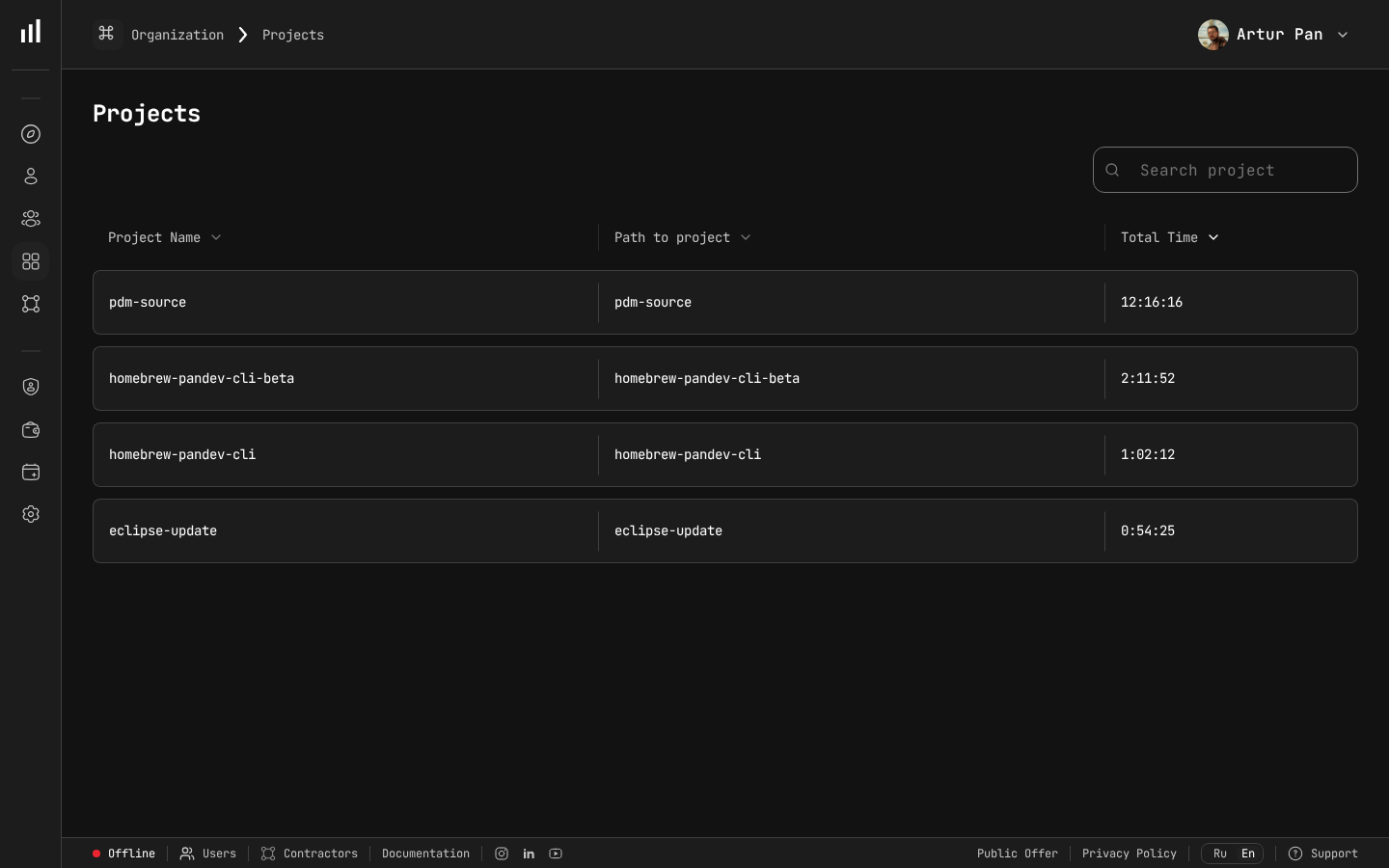 A single multi-project view lets you see all client projects, their tracked hours, and time allocation at a glance.
Principle 2: Track Actual Hours, Not Planned Hours
Planned allocation says Developer X should spend 80 hours on Client A this month. But what actually happened?
Without real data, you're managing based on assumptions. With IDE activity tracking, you know exactly how many hours each developer spent on each project — down to the day.
This matters for three reasons:
-
Budget accuracy. If Client A's budget allows 320 developer-hours this month and you've burned 280 by week three, you know to slow down before overrunning.
-
Allocation drift. Developers naturally gravitate toward interesting problems. Without tracking, Developer X might spend 60% of their time on Client A's challenging microservice architecture and only 40% on Client B's routine CRUD work — the opposite of what was planned.
-
Evidence for difficult conversations. When Client B asks why progress is slow, you can show that their allocated developer spent 35% of the week on emergency bug fixes for Client B's own production issues — not a planning failure, but a priority shift they initiated.
Principle 3: Automated Per-Project Cost Tracking
When you manage five projects, manual cost tracking breaks down. You can't spend an hour per project per week reconciling timesheets against budgets.
Set up automated cost tracking:
- Assign hourly rates to each developer (or per-project rates if they differ by client)
- Let the platform calculate costs based on real tracked hours
- Set budget alerts — get notified when a project reaches 75% and 90% of monthly budget
- Review weekly — a 5-minute scan of all five projects' cost dashboards
Example weekly cost overview:
| Project | Budget | Spent | Remaining | Status |
|---|---|---|---|---|
| Client A — E-commerce | $32,000 | $18,400 | $13,600 | On track |
| Client B — FinTech App | $24,000 | $22,100 | $1,900 | Over-burning |
| Client C — SaaS Backend | $16,000 | $9,200 | $6,800 | Under-burning |
| Client D — Mobile App | $20,000 | $14,500 | $5,500 | On track |
| Client E — Data Pipeline | $12,000 | $7,800 | $4,200 | On track |
This five-line table tells you everything. Client B needs attention immediately. Client C might have a blocked developer. The other three are fine. Total time to assess: 30 seconds.
Principle 4: Developer Dashboards for Self-Management
You can't micromanage 15-25 developers across five projects. You shouldn't even try. Instead, give developers access to their own activity dashboards.
When developers can see their own data:
- They notice when they've been under-contributing to a project and self-correct
- They can report blockers with evidence ("I spent 6 hours debugging the auth service — there's a deeper architectural issue")
- They take ownership of their time allocation instead of waiting for you to tell them what to do
This shifts the PM role from time police to strategic coordinator — which is where your value actually lies.
Principle 5: Standardized Client Reporting
When you manage five clients, you can't write five custom reports every month. You need a reporting template that works for everyone.
The report structure that works:
Page 1: Executive Summary
- Total hours billed
- Total cost
- Key deliverables this period
- Health status (green/yellow/red)
Page 2: Hour Breakdown
- Developer-by-developer hours
- Daily activity chart
- Comparison to previous period
Page 3: Cost Analysis
- Cost by developer
- Cost by activity type (if available)
- Budget utilization percentage
PanDev Metrics generates this as an Excel export with one click. Five projects × one click each = five client reports in under five minutes.
Practical Tactics for the Multi-Project PM
Beyond the data framework, here are tactical approaches that work:
The Monday Morning Scan (15 minutes)
Every Monday, before anything else, do a 15-minute scan of all projects:
- Open your multi-project dashboard (3 minutes)
- Check last week's actual hours vs. planned for each project (3 minutes)
- Check budget burn rates (2 minutes)
- Identify the top risk — which project needs intervention this week? (2 minutes)
- Check developer allocation — is anyone overloaded or underutilized? (3 minutes)
- Draft your priorities for the week (2 minutes)
This ritual replaces the 2-hour Monday morning confusion with a structured, data-informed start.
The Traffic Light System
Assign a daily status to each project based on data, not feelings:
- Green: Tracked hours match plan, budget on track, no client escalations
- Yellow: Minor deviation — hours 10-20% off plan, or budget burn slightly high
- Red: Major issue — developer went silent, budget overrun, client escalation
Check the traffic lights once daily. Only invest deep attention in yellow and red projects. Green projects don't need you today.
Developer Rebalancing
When tracking shows that Project A is over-burning while Project C is under-burning, rebalance:
- Identify which developers on Project A have transferable skills for Project C
- Check that the developer's daily activity on Project A is genuinely complete (not just paused)
- Move 1-2 days of the developer's week from A to C
- Monitor the impact in the next week's data
Without real activity data, rebalancing is guesswork. With data, it's a precision operation.
The Friday Snapshot
Every Friday afternoon, capture the state of all five projects:
- Current week's hours per project
- Any client communications that need follow-up Monday
- Any developers who will be unavailable next week (PTO, sick, moved to another project)
- Budget status
Store this in a simple document or dashboard bookmark. When Monday comes, you don't start from zero.
Managing Developer Allocation Across Projects
Developer allocation is the hardest part of multi-project management. Here's a data-driven approach:
The Allocation Matrix
Maintain a clear view of who works on what:
| Developer | Mon | Tue | Wed | Thu | Fri |
|---|---|---|---|---|---|
| Alex K. | A | A | A | B | B |
| Maria S. | C | C | D | D | D |
| James T. | A | A | A | A | A |
| Olga P. | B | B | C | C | E |
| Denis R. | E | E | E | D | D |
Then compare it to actual tracked hours each week. The gap between planned and actual allocation reveals:
- Scope creep: Client A's project is consuming more developer time than planned
- Context switching: A developer supposed to be on one project is bouncing between three
- Underutilization: A developer is tracking fewer hours than expected — possibly blocked or disengaged
The Split Developer Problem
Developers who split across multiple client projects face extreme context-switching costs. Best practices:
- Minimize splits. If possible, dedicate developers to single projects. A developer at 100% on one project is more effective than at 50% on two. The Accelerate research (Forsgren, Humble, Kim) confirms that reducing work-in-progress is one of the strongest predictors of team performance.
- When splits are necessary, use full-day blocks. Mon-Wed on Project A, Thu-Fri on Project B is far better than alternating projects daily.
- Track the cost of splitting. Compare a split developer's total output to a dedicated developer's output. The difference is your context-switching tax — and it can inform your pricing for shared resources.
Scaling Beyond Five Projects
The framework above works for 5 projects. But what about 10? 20?
The principles stay the same, but you need additional structure:
Tier your projects
Not all projects need the same attention:
- Tier 1 (high-touch): Large contracts, strategic clients, complex projects — weekly deep review
- Tier 2 (standard): Stable projects with experienced teams — bi-weekly review
- Tier 3 (low-touch): Small, stable engagements — monthly review unless something triggers an alert
Use budget alerts as your early warning system
Configure alerts for every project:
- 75% budget consumed → Review pace and plan for the remainder
- 90% budget consumed → Alert the client and discuss options
- 100% budget consumed → Stop work until the client approves additional budget
With alerts in place, you don't need to check every project every day — the system tells you when to pay attention.
Delegate with data
As you take on more projects, you'll need to delegate some to junior PMs or team leads. Data makes delegation safer:
- The junior PM has the same dashboard you do
- You can audit their projects in minutes by checking the numbers
- Escalation triggers are objective (budget alerts, activity drops) not subjective
Key Takeaways
- Multi-project management in outsourcing requires a data-driven system, not heroic multitasking
- A single multi-project dashboard replaces mental juggling with clear visibility
- Track actual hours per project — the gap between planned and actual reveals allocation problems early
- Automated cost tracking and budget alerts prevent overruns before they happen
- Standardized one-click reports save hours of weekly PM time
- Developer self-management through personal dashboards reduces PM micromanagement
- Scale by tiering projects and delegating with objective data
Manage all your projects in one place. PanDev Metrics gives outsourcing PMs a multi-project dashboard with real-time developer activity, per-project cost tracking, and one-click client reports — so you stay in control, no matter how many clients you juggle.