Notion for Engineering Teams: Documentation Playbook

Notion passes a hidden failure threshold around 300 pages per engineering workspace. Up to that point, the tool is loved. Past it, search breaks down, duplicate pages accumulate, and the team splits into two camps: one that keeps writing, one that stops reading. Stack Overflow's 2024 Developer Survey put Notion in the top 3 non-IDE tools engineers use daily — but also flagged it as the #1 tool engineers abandoned within 18 months, mostly from exactly this collapse.
The collapse isn't Notion's fault. It's a structure problem. This is a playbook for a 7-database engineering workspace that stays navigable from 5 to 50 engineers, and the specific rules that prevent the 300-page collapse.
The problem: Notion optimizes for writing, not finding
Notion is the best tool we've tested for writing a doc quickly. It's among the worst for finding a doc three months later. The gap is why workspaces rot.
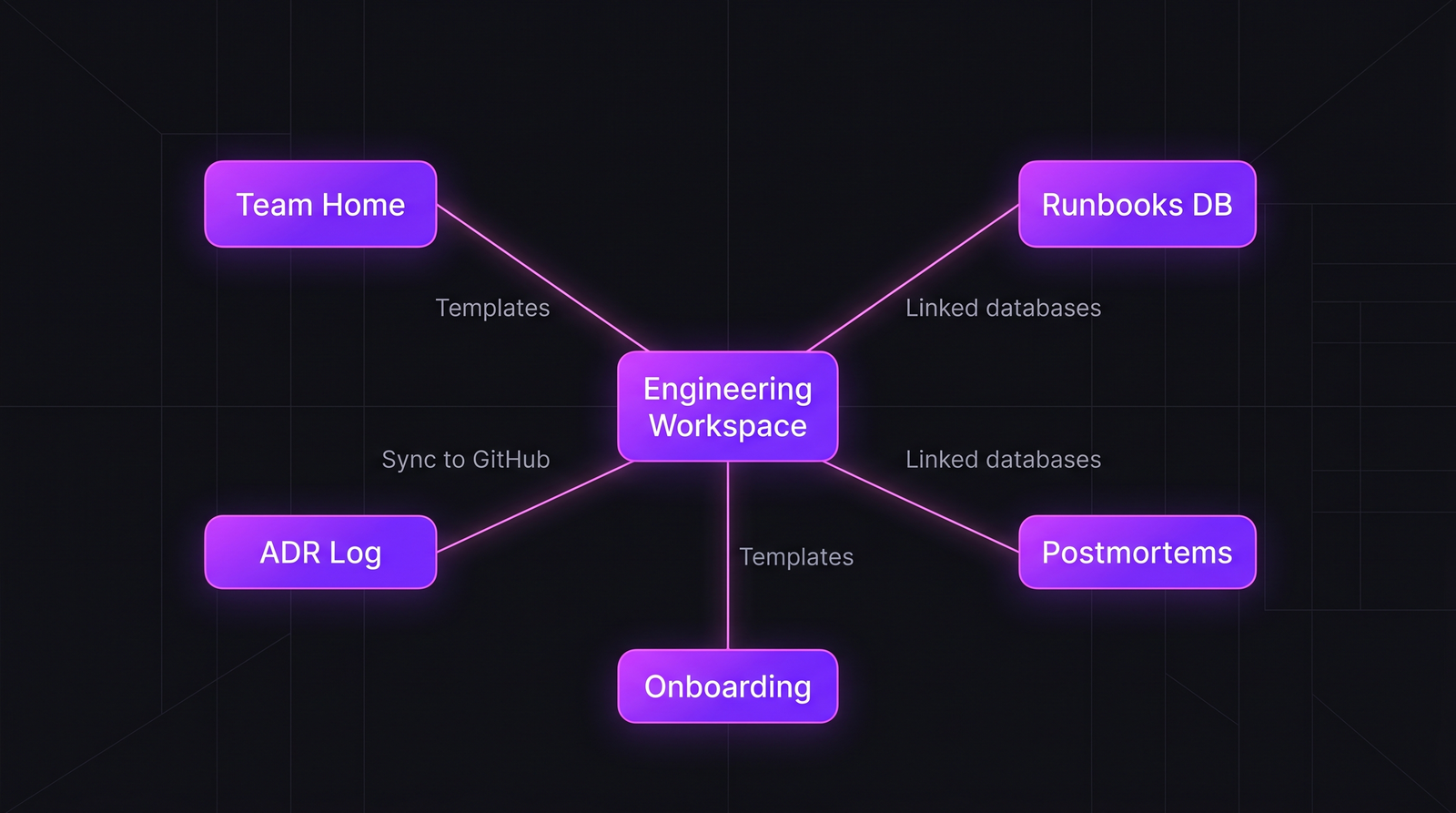 A 7-database engineering workspace. Each database has one type of content, one owner, and one lifecycle — the structure that prevents the 300-page collapse.
The three failure modes we've seen repeatedly:
- Page soup. Every doc is a "page" in a hierarchy tree. After 200 pages, nobody can find anything without asking in Slack. Slack-to-doc ratio rises. Writing stops.
- Duplicate runbooks. Three engineers write "how to deploy staging" in three different places. Six months later none matches reality. New hires get random versions.
- Stale ADRs. Architecture Decision Records live next to ephemeral meeting notes. When ADRs are mixed in with "Q3 planning scratchpad," their authority erodes.
The framework: 7 databases, each with one job
Use databases, not nested pages. A database has schema, filters, views, and — critically — one explicit content type per row.
Database 1 — Team Home (per-team landing page)
One page per team. Pinned at top. Contains:
- Team roster (people mentioned properly so they show in sidebars)
- On-call link
- Current sprint / cycle view (usually embedded from Linear or Jira)
- Top 5 runbooks linked
- Last postmortem linked
Owner: EM of the team. Updated bi-weekly. This is the page new hires bookmark on day one.
Database 2 — Runbook DB
One row per operational runbook. Schema:
| Property | Type | Example |
|---|---|---|
| Title | Title | "Rotate production Redis credentials" |
| Owner team | Relation | Platform |
| Last verified | Date | 2026-03-14 |
| Last verified by | Person | @Ahmed |
| Systems affected | Multi-select | Redis, API |
| Stale? | Formula | if (today - Last verified > 90) "⚠" else "" |
| Risk | Select | Low / Medium / High |
The Stale? formula is the key. Any runbook unverified in 90+ days gets a visible stale flag. Monthly, the owner runs a filter "Stale = ⚠" and re-verifies or archives.
Database 3 — Architecture Decision Records (ADR)
Numbered ADRs, like ADR-001, ADR-002. Schema:
| Property | Type |
|---|---|
| Number | Number (auto-increment via button) |
| Title | Title |
| Status | Select (Proposed / Accepted / Superseded / Deprecated) |
| Context | Page body |
| Decision | Page body |
| Consequences | Page body |
| Superseded by | Relation (self-referential) |
ADRs are never deleted. Superseded ones stay readable so the "why" of current decisions is traceable. IEEE's 2022 paper on architecture knowledge decay (Capilla et al.) showed that teams with persistent ADR logs had 2.4× lower repeated-decision rework than teams that rewrote architecture docs in place.
Database 4 — Postmortems
One row per incident. Schema:
| Property | Type |
|---|---|
| Incident date | Date |
| Severity | Select (SEV-1 / SEV-2 / SEV-3) |
| Duration | Number (minutes) |
| Customer impact | Text summary |
| Root cause category | Multi-select (config, code, dependency, human, external) |
| Action items | Relation → action-items DB |
| Action items status | Rollup |
The magic is the rollup column: at a glance, which postmortems still have open action items. The 2024 Google SRE report flagged that 43% of postmortem action items never ship. A visible status column makes that failure mode impossible to hide.
Database 5 — Onboarding Tasks
A template-able database that gets cloned per new hire. First-week, first-month, first-quarter tasks as rows, with "Done?" checkboxes and owner pointers. New hires see their own slice and can self-pace.
Database 6 — Team Docs (the catch-all, bounded)
Yes, you still need a catch-all for "here's the design of the order-routing service." But bound it with required properties:
| Property | Required |
|---|---|
| Title | Yes |
| Owner | Yes |
| Last updated | Yes (auto) |
| Doc type | Yes — Spec / Design / How-to / Reference / Research |
| Audience | Yes — Internal / External / Both |
No row without properties. The lack of required properties is why standard Notion workspaces rot — pages accumulate with no metadata, so filters become useless.
Database 7 — People (lightweight directory)
One page per engineer. Pronouns, timezone, current projects, learning goals, on-call rotation. Not a replacement for HRIS — a complement. Used by EMs for 1:1 prep and by cross-team collaboration.
Templates that enforce the structure
Each database needs page templates configured so that creating a new row pre-fills the right structure. Examples:
Runbook template:
# {Title}

## When to use this runbook
{trigger condition}

## Prerequisites
- Access: {list}
- Tools: {list}

## Steps
1. {step}
2. {step}

## Verification
{how to confirm success}

## Rollback
{steps to undo}

## Related
- Incident playbook: {link}
- ADR: {link}
Without a template, engineers write runbooks in inconsistent shapes and the whole DB devolves into freeform pages.
Common mistakes to avoid
| Mistake | Why it hurts | Fix |
|---|---|---|
| Mixing databases with free pages in the same hierarchy | Search returns garbage | Strict DB-only structure |
| No "stale" formula on runbooks | Outdated runbooks mislead new hires | 90-day staleness flag |
| Letting anyone delete ADRs | Decision history lost | ADRs are append-only; supersede, don't delete |
| Deep nesting (>3 levels) | Nobody clicks to depth 4 | Flat databases with good filters |
| Sharing single pages outside DBs | Creates orphan content | Every doc lives in a database |
| Relying on Notion search alone | Notion search is weak at 500+ pages | Add a Tags multi-select per DB |
| No retention policy | Workspace grows forever | Quarterly archive of anything Last updated > 365d and tagged ephemeral |
The 300-page survival rules
For teams crossing the 300-page threshold:
- Require property completeness in Team Docs. Lock the
Createbutton until required properties are filled. - Publish a monthly "stale hit list" — automated via Notion's built-in filters, sent to the EM channel.
- Archive, don't delete. Move old content to an Archive DB, not Recycle Bin. Someone will need it in 2 years.
- Use sub-workspaces for customer-facing docs. Anything public should live in a separate workspace you can share externally without exposing internals.
- Adopt Notion AI as a last-resort search — it's good at semantic recall but expensive at scale ($8-10/user/month extra).
How to measure if it's working
Track monthly:
- Mean time to find a doc — spot-check with new hires. Target under 3 minutes.
- Stale runbook ratio — pages with
Last verified > 90 days. Target under 15%. - Duplicate page count — semantic duplicates detected via manual audit. Target zero active duplicates.
- Slack-to-doc ratio — how often "where are the docs for X?" is asked. Declining is good.
PanDev Metrics doesn't see inside Notion directly, but it does see the absence of documentation-maintenance time. If your team's weekly IDE activity shows zero time in Markdown editing or in the Notion browser extension for three consecutive weeks, you have a documentation decay signal — regardless of what any Notion dashboard shows. We cover this cross-tool pattern in our knowledge management post on comparing Notion, Confluence, GitHub Wiki, and Git-native docs.
Honest limit: we don't have data on which specific Notion workspace structures correlate with long-term team success. The 7-database pattern above is field-tested with ~a dozen engineering teams we've worked with, not a cross-company study.
When this playbook doesn't fit
- Teams under 10 engineers — most of this is overhead. A single page + a runbook list is enough.
- Highly regulated industries (fintech, medtech) — audit requirements often force Confluence or self-hosted wikis; Notion's compliance certifications are improving but still lag for financial and healthcare audits.
- Teams already committed to docs-as-code — don't migrate away. A
docs/folder + MkDocs is better for pure technical content than Notion will ever be.