Staff Augmentation: How Clients Can See Augmented Developer Activity in Real Time

Staff augmentation is now the fastest-growing segment of the outsourcing market, according to the Deloitte Global Outsourcing Survey. Yet the model introduces a paradox that most buyers discover too late. You've augmented your engineering team with external developers. They attend your standups, push to your repos, and bill you monthly. But when the invoice arrives, you have an uncomfortable thought: "I have no idea how these people actually spend their days."
You trust your in-house team because you see them in Slack, in code reviews, in the office. The augmented developers? They're a black box. And that black box is costing you tens of thousands of dollars a month.
The Staff Augmentation Visibility Problem
The model is simple: you "rent" developers from a vendor, and they work as part of your team. Unlike project-based outsourcing, you manage them directly.
But this creates a paradox: you have management responsibility without full management visibility.
With in-house developers, you accumulate informal signals:
- You see who's online in the office or Slack
- You notice who's active in code reviews
- You hear who's asking smart questions in architecture discussions
- You get a gut feeling for who's productive
With augmented developers — especially remote ones — most of these signals disappear. You're left with:
- Git commits (lagging indicator, easy to game)
- Jira ticket movement (tells you what was done, not how long it took)
- Self-reported status updates (subjective, infrequent)
This information gap creates three problems:
Problem 1: You Can't Justify the Cost
When your CFO asks "are these external developers worth $10,000/month each?", you need more than "they seem to be doing good work." You need data showing hours worked, projects contributed to, and output consistency.
Problem 2: You Can't Compare Performance
Your in-house developer and the augmented developer work on similar tasks. You think the in-house developer is more productive, but is that perception or reality? Without comparable metrics, you can't make fair assessments.
Problem 3: You Can't Manage Effectively
If an augmented developer is struggling — blocked by unclear requirements, fighting unfamiliar tooling, or simply underperforming — you won't know until deliverables slip. By then, you've lost weeks of time and budget.
What Real-Time Visibility Looks Like
"Real-time visibility" doesn't mean watching a developer's screen. That's surveillance, and it destroys the trust that makes staff augmentation work.
Real-time visibility means having access to activity metrics that update continuously:
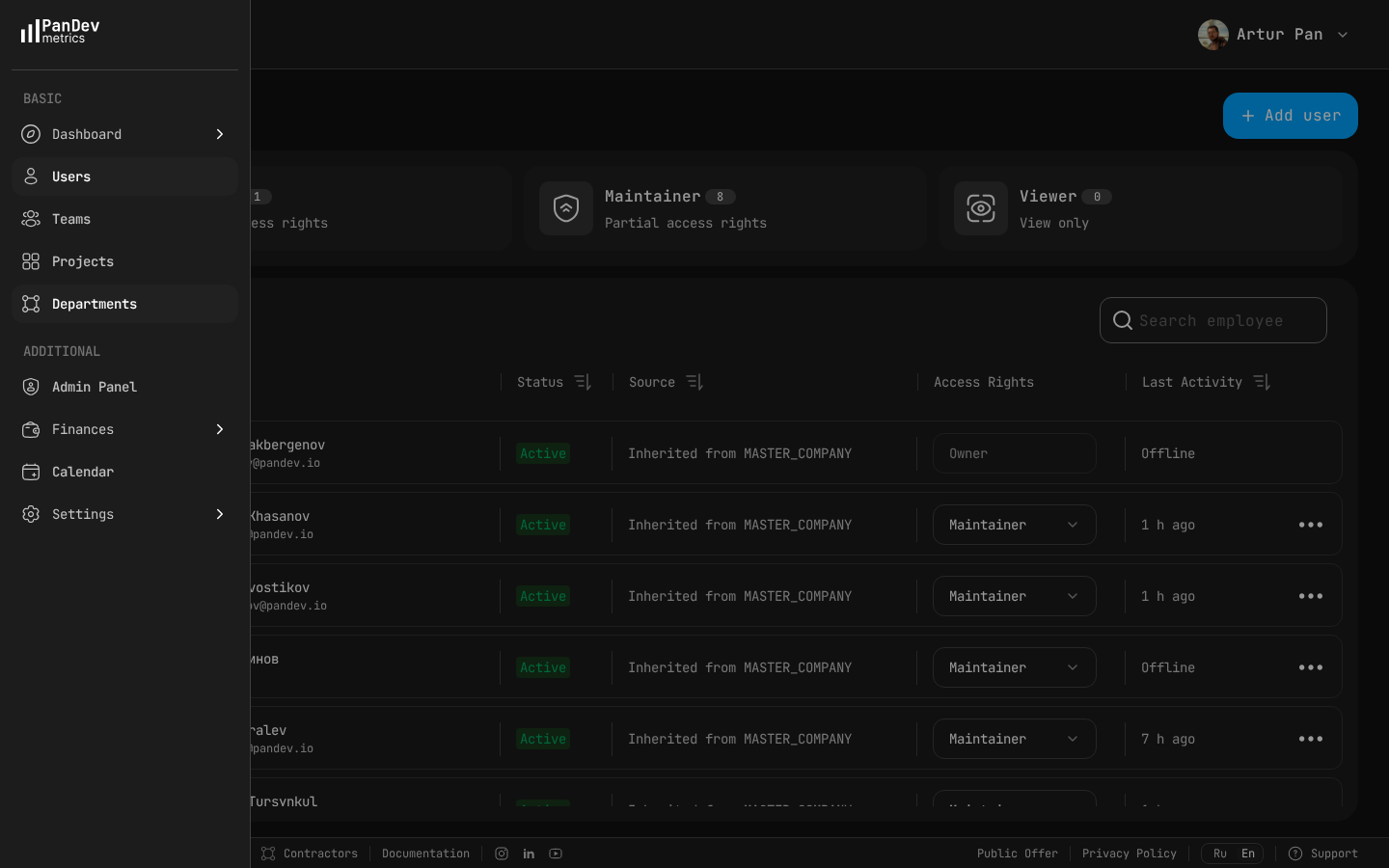 The employee list view shows each developer's status (Active/Inactive), access rights, and last activity timestamp — giving you instant visibility into augmented developer activity without invasive monitoring.
Activity Dashboard
A dashboard showing each augmented developer's:
- Hours coded today — How much active IDE time has been logged so far?
- Hours coded this week/month — Are they on pace for the contracted hours?
- Project activity — Which repositories and services are they working on?
- Activity pattern — When do they typically start and end their coding day?
- Technology breakdown — What languages and frameworks are they working in?
This isn't surveillance data. It's the same kind of data your in-house developers generate when they push commits, update tickets, and appear in Slack. The difference is it's automated, consistent, and objective.
How It Works Technically
The augmented developer installs a lightweight IDE plugin (takes 2 minutes). The plugin sends activity heartbeats — metadata about coding activity — to a platform like PanDev Metrics.
What the heartbeat contains:
- Timestamp
- Project name
- Programming language
- Activity type
What the heartbeat does NOT contain:
- Screen content
- File contents
- Keystrokes
- Personal browsing data
The plugin runs silently inside the IDE. It doesn't affect performance, doesn't pop up notifications, and doesn't require any manual action from the developer. They install it once and forget about it.
As the client, you get a read-only dashboard showing aggregated activity for your augmented developers. You can see daily hours, weekly trends, and project-level breakdowns — all updated in real time.
Setting Up Client Visibility: A Step-by-Step Guide
Step 1: Negotiate Visibility in the Contract
Visibility should be discussed before the engagement starts, not after problems arise. Add a clause to your staff augmentation agreement:
"The vendor agrees to provide real-time activity tracking for all augmented developers assigned to the client's projects. Tracking will be limited to IDE activity metadata (timestamps, project names, languages) and will not include screen capture or keystroke logging."
Most modern outsourcing vendors will agree to this. Many already have tracking in place for their own internal management.
Step 2: Choose the Tracking Platform
You have two options:
Option A: Vendor's Platform The outsourcing vendor already uses PanDev Metrics (or similar). They grant you read-only access to view your augmented developers' dashboards. This is the fastest path — no setup on your side.
Option B: Client's Platform You deploy PanDev Metrics yourself (cloud or on-premise) and ask the augmented developers to install plugins connected to your workspace. This gives you full control over the data and ensures it meets your security requirements.
For most engagements, Option A is sufficient. For security-sensitive projects (fintech, healthcare, government), Option B with on-premise deployment is recommended.
Step 3: Configure Developer Profiles
For each augmented developer, set up:
- Name and role — Senior Backend Developer, Frontend Engineer, etc.
- Hourly rate — as per the contract
- Project assignment — which of your projects they're working on
- Expected hours — contracted hours per month (e.g., 160)
This allows the platform to calculate:
- Cost per developer
- Budget utilization
- Hours worked vs. contracted
Step 4: Establish a Baseline (Week 1-2)
Don't jump to conclusions from the first day of data. Give the system two weeks to establish a baseline:
- What's the typical daily coding time for each developer?
- What's their natural work pattern (early start? late finish? lunch break visible?)
- How many hours per week are they consistently delivering?
Use this baseline as the "normal" against which you measure future activity.
Step 5: Set Up Alerts
Configure alerts for situations that need attention:
- Low activity alert: Developer logs less than 4 hours of IDE time for 2 consecutive days
- Budget alert: Spending reaches 75% or 90% of monthly budget
- Inactivity alert: No activity recorded for a full business day (might indicate a blocker or unreported PTO)
Alerts turn the dashboard from something you have to check into something that notifies you when it matters.
What to Do With the Data
Having data is one thing. Using it well is another. Here's how to act on augmented developer activity data without being a micromanager.
Weekly Glance (2 minutes)
Once a week, pull up the dashboard and check:
- Are contracted hours on pace? If you're paying for 160 hours/month, by week 2 they should be around 80 hours. If they're at 60, ask why.
- Are they working on the right project? If your augmented backend developer is spending 30% of their time on a project you don't recognize, clarify.
- Is the pattern consistent? Sudden drops in activity suggest blockers or disengagement.
Monthly Review (15 minutes)
At the end of each month:
- Compare actual hours to contracted hours. Are you getting what you're paying for?
- Calculate effective cost. If you're paying $10,000/month for a developer who logged 140 hours, your effective rate is $71.43/hour. Compare this to your contracted rate.
- Review the trend. Is activity increasing (developer ramping up), stable (fully productive), or declining (possible disengagement)?
- Share with the vendor. If there are issues, bring data to the conversation. "Your developer logged 120 hours against a 160-hour contract" is a much more productive conversation starter than "we feel like we're not getting enough output."
Quarterly Strategic Review (30 minutes)
Zoom out and evaluate:
- Is staff augmentation delivering ROI? Compare the cost of augmented developers to the value of their output.
- Should you convert any augmented developers to full-time? High-performing, consistently utilized developers might be cheaper in-house long-term.
- Should you scale up or down? Activity data shows whether your current team is at capacity or has room for more work.
Comparing In-House and Augmented Developer Metrics
One of the most powerful uses of activity tracking is comparing in-house and augmented developers on the same metrics.
| Metric | In-House Team (avg) | Augmented Devs (avg) |
|---|---|---|
| Daily IDE time | 6.2 hours | 6.8 hours |
| Active coding days/month | 20 | 21 |
| Primary project focus | 85% | 92% |
| Code review participation | 4.5 hours/week | 2.1 hours/week |
| Technologies used | 3.2 | 2.1 |
Example data — not from a specific company.
This comparison might reveal that augmented developers log more hours but participate less in code reviews — suggesting they're productive but not fully integrated into the team's workflows. That's an actionable insight: pair them more frequently in code reviews to increase integration.
Privacy and Trust: Getting the Balance Right
Activity tracking can strengthen or destroy the augmented relationship depending on how you implement it.
Do:
- Be transparent about tracking. Tell augmented developers exactly what's tracked and what isn't. Show them the dashboard they'll appear on.
- Track metadata, not content. Timestamps, project names, and languages — not screen content, keystrokes, or file contents.
- Use data for management, not punishment. Low hours for a day should trigger a "are you blocked?" conversation, not a reprimand.
- Track everyone equally. If you track augmented developers, track in-house developers too. Unequal tracking creates resentment.
- Respect time zones. Augmented developers may work in different time zones. Judge their output by daily totals, not by whether they're online during your business hours.
Don't:
- Don't use screenshots. Screenshot monitoring is invasive, easy to game, and signals distrust. It's counterproductive.
- Don't share individual data widely. Activity data should be visible to the developer's direct manager, not broadcast to the entire company.
- Don't micro-react to daily fluctuations. A developer having a 4-hour day after three 8-hour days is normal — they might be doing research, attending meetings, or simply recovering from deep work. Look at weekly and monthly patterns instead.
- Don't equate IDE time with output. A senior developer who codes for fewer hours but solves a critical architecture problem is more valuable than a junior developer who writes boilerplate all day. This is consistent with the SPACE framework (Forsgren et al., 2021), which emphasizes that productivity must be measured across multiple dimensions. Use activity data as one input, not the only input.
The Vendor's Perspective: Why This Benefits Them Too
If you're an outsourcing vendor reading this, real-time visibility isn't a threat — it's a selling tool.
It reduces churn
Clients who can verify activity stay longer. The ones who leave are usually the ones who built up doubt over months without any way to resolve it.
It justifies your rates
When a client sees their augmented developer logging 7+ hours of active coding daily, your $80/hour rate feels like a bargain compared to the cost of hiring full-time.
It differentiates you from competitors
Offer real-time dashboards to clients and watch your close rates improve. When a prospect is choosing between you and a competitor who only offers monthly reports, the visibility advantage is decisive.
It protects you from unfair accusations
If a client claims your developer isn't working, you have timestamped data to prove otherwise. Data is your shield.
Implementation Checklist
For CTOs considering activity tracking for augmented developers:
- Evaluate tracking platforms (PanDev Metrics, etc.)
- Decide on deployment model (vendor's cloud, your cloud, on-premise)
- Add visibility clause to staff augmentation contracts
- Brief augmented developers on what's tracked and why
- Configure developer profiles with rates and project assignments
- Establish a 2-week baseline before drawing conclusions
- Set up automated alerts for low activity and budget thresholds
- Schedule weekly dashboard check (2 minutes) and monthly review (15 minutes)
- If tracking augmented devs, consider tracking in-house devs equally
- Share anonymized metrics in quarterly vendor reviews
Key Takeaways
- Staff augmentation creates a visibility gap — you manage the developers but can't see their daily work patterns
- Real-time visibility through IDE activity tracking closes this gap without surveillance
- Activity data helps justify cost, compare performance, and detect problems early
- Track metadata (timestamps, projects, languages), never screen content or keystrokes
- Use data for weekly glances, monthly reviews, and quarterly strategic decisions
- Treat augmented and in-house developers equally in tracking policies
- For vendors: real-time visibility is a competitive advantage, not a threat
See what your augmented team actually does. PanDev Metrics gives CTOs real-time IDE activity dashboards for augmented developers — hours tracked, projects identified, costs calculated — all without screenshots or invasive monitoring.