CLI plugin
The PanDev Metrics CLI plugin records terminal activity as heartbeats — name of the command + timestamp — so your time in the shell shows up in dashboards alongside IDE, Git, and task-tracker data.
The CLI plugin is a small background daemon installed on a developer machine. It does not read, store, or transmit command arguments, flags, environment variables, file contents, or secrets. Only the base command name and the moment you ran it are sent to the PanDev Metrics server.
CLI metrics in the web app
The web app reports CLI activity on its own page, with the terminal and command breakdowns visible per developer:
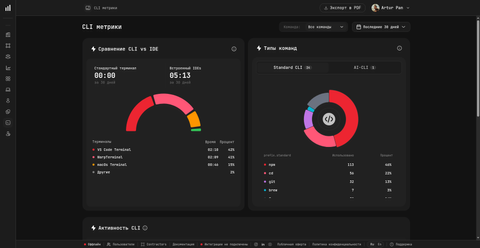
Standard CLI vs AI-CLI
PanDev Metrics splits captured commands into two categories so AI-coding activity is visible separately from regular shell work:
| Category | What it covers | Examples |
|---|---|---|
| Standard CLI | Day-to-day shell tools, build systems, package managers, git, infra CLIs | npm, git, brew, docker, kubectl, cd (excluded by default) |
| AI-CLI | AI coding assistants invoked from the terminal | AI coding tools that run as a command from the shell, tracked on a separate counter |
Both streams use the same heartbeat format (base command + timestamp). The split happens server-side and lets you compare time spent in conventional tooling against time spent prompting AI tools from the terminal — the same way the IDE plugins overview splits developer activity from AI activity inside an editor.
At a glance
| Property | Value |
|---|---|
| Purpose | Terminal activity heartbeats |
| Captured | Base command name + timestamp |
| Not captured | Arguments, flags, env vars, secrets, output, file contents |
| Transport | HTTPS / TLS |
| Authentication | PanDev Metrics API token (pandev_…) |
| Audience | Every developer in the tenant |
| Configuration UI | Settings → Plugin → CLI plugin |
Supported platforms
| Platform | Status | Installation guide |
|---|---|---|
| macOS | Stable | Install on macOS |
| Linux | Stable | Install on Linux |
| Windows | Stable | Install on Windows |
On Windows the plugin installs via a PowerShell one-liner instead of Homebrew — see Install on Windows. Authentication is the same token on all three platforms.
What gets captured
The CLI plugin watches your shell and emits one event per command. Each event contains:
| Field | Example | Notes |
|---|---|---|
| Command | git, npm, docker, kubectl | Base command only — the part before the first space |
| Timestamp | 2026-05-13T14:21:08Z | When the command was invoked |
| Host | hostname | For multi-machine attribution |
| User | PanDev Metrics login | Linked to your account |
What is NOT captured
The privacy guarantee is built into the plugin — there is no setting that turns these on:
- Command arguments (no file paths, branch names, hostnames)
- Command flags (no
--token,--password,--key) - Environment variables
- Standard output / standard error
- File contents
- Working directory
Example:
# You run:
git commit -m "fix CVE-2026-1234" --author="alice@example.com"

# PanDev sees:
git   # + timestamp
This is by design. The CLI plugin is a heartbeat, not an audit log.
How it fits the time model
Heartbeats from the CLI plugin feed the same active-time calculation as the IDE and browser plugins. If gaps between events stay below 15 minutes, the time counts as active developer time. Gaps over 15 minutes break the session.
CLI activity therefore counts toward:
- Active hours per developer
- Time on task when a task is open in the IDE alongside the terminal
- DORA metrics that depend on hands-on time
Authentication
The CLI plugin signs in with an API token. There is no server URL, login, or password to enter — the token already carries the server address and the workspace.
Get the token from the web app: Settings → Plugins → CLI, then copy the value from the Enter your token step. Tokens start with pandev_.
pandev login
# Enter your PanDev token (starts with 'pandev_'):
Or pass it straight to the command, which is what you want in a provisioning script:
pandev login -t pandev_...
--token pandev_... and --token=pandev_... work the same way. The token is stored locally, so the daemon reconnects on its own after restarts.
A token is a credential — anyone holding it can send metrics as you. Keep it out of commits and shared chats. If it leaks, open the same step in the web app and hit Rotate token or Revoke token.
The same token works for the IDE plugins and the browser extensions. Each user has one active token per workspace, so rotating it means re-running pandev login -t with the new value.
For on-prem deployments with self-signed certificates, see the troubleshooting section of your platform guide.
Verification
After installation, three commands let you check the plugin is alive:
pandev status   # Confirms daemon is running and authenticated
pandev time     # Shows captured CLI time for today
pandev --help   # Lists every command the plugin exposes
Configuration in the UI
Administrators can review CLI plugin connections under Settings → Plugin → CLI plugin. Each active developer machine appears with the last heartbeat time. If a connection is missing, the developer needs to re-run pandev login.
Offline behaviour
If the developer machine is offline, the plugin queues events locally. When the network returns, the queue flushes to the server in order. No events are lost; timestamps are preserved.
FAQ
Why only the command name and not the arguments?
Arguments routinely contain secrets (--token, --password), private paths (/home/alice/secrets/), and sensitive identifiers (issue numbers, customer IDs). PanDev Metrics is a productivity tool, not an audit tool — recording only the base command keeps the privacy contract simple and irrevocable.
Does the CLI plugin work in tmux / screen / SSH sessions?
Yes. The plugin hooks into the shell, not the terminal emulator. Tmux panes, screen windows, and SSH sessions all produce heartbeats as long as the plugin is installed on the machine running the shell.
Does it slow down my terminal?
No. Each heartbeat is a single non-blocking write to a local queue. The daemon flushes to the server in the background.
Can I exclude specific commands?
Currently, exclusions are not user-configurable in the CLI plugin. The whitelist of tracked commands is set globally and excludes shell built-ins (cd, ls, pwd, etc.) by default.
Does it require sudo or root?
Installation requires elevated rights on macOS (Homebrew tap install + a one-time sudo pandev-cli-plugin --install). After installation, the daemon runs as your user.