GitHub Integration with PanDev Metrics
TL;DR. This guide connects GitHub to PanDev Metrics in about 10 minutes. You will install a GitHub App on your organization (recommended) or generate an OAuth token, paste it into PanDev Metrics, and verify that commits, pull requests, and reviews start flowing into your dashboards. Audience: admin.
Before you begin
- PanDev Metrics version ≥ 1.0.250 (Cloud users always meet this)
- Admin access to your PanDev Metrics tenant
- Owner or Admin role in the GitHub organization (required to install the App)
- For on-prem PanDev Metrics: the instance must reach
api.github.com(Cloud) or your GitHub Enterprise Server host on port 443 - For GitHub to reach an on-prem PanDev Metrics deployment: the PanDev Metrics host must be reachable from GitHub at the public webhook URL
:::tip Recommended path We recommend the GitHub App flow — it scopes permissions per-repository, supports webhook delivery out of the box, and rotates credentials automatically. :::
Step 1 — Choose GitHub App or OAuth
PanDev Metrics supports two GitHub connection modes. Pick one before you continue.
| Mode | When to use | Permissions model |
|---|---|---|
| GitHub App (recommended) | Organization-wide rollout, fine-grained repo selection | Repository: Read, Pull Requests: Read/Write |
| OAuth / Personal Access Token | Single repo or quick test under a service account | Same scopes via fine-grained PAT |
The rest of this guide covers the GitHub App path. The OAuth flow uses the same UI screen — paste a fine-grained PAT with Contents: Read and Pull requests: Read and write instead of going through the App install.
Step 2 — Open the GitHub integration screen in PanDev Metrics
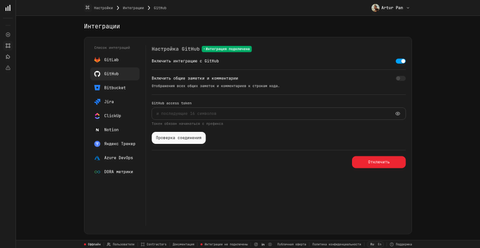
Sign in to PanDev Metrics as a workspace admin and open Settings → Integrations → GitHub.
If you see no GitHub card, your edition does not have this integration enabled — contact your administrator or reach out on Telegram.
Step 3 — Install the PanDev Metrics GitHub App
Select Install GitHub App. PanDev Metrics redirects you to GitHub. On the GitHub page:
- Choose the organization where the App should be installed.
- Select All repositories or Only select repositories (you can change this later in GitHub).
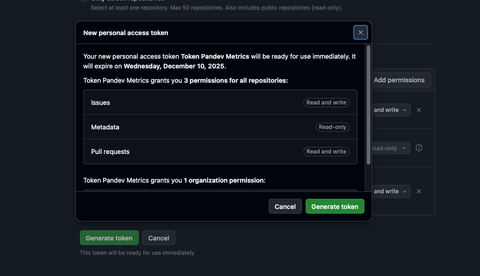
- Review the requested permissions:
| Permission | Access | Why |
|---|---|---|
| Repository contents | Read-only | Read commits, branches, files for analysis |
| Pull requests | Read and write | Read PR metadata; post quality comments on PRs |
| Metadata | Read-only | List repositories — mandatory for any GitHub App |
- Select Install. GitHub redirects back to PanDev Metrics with the installation ID populated.
:::note For on-prem deployments
On-prem admins configure three environment variables on the PanDev Metrics container: GITHUB_APP_NAME, GITHUB_APP_ID, and GITHUB_PRIVATE_KEY_BASE_64 (the App's private key, base64-encoded). See On-prem network and ports for the full list.
:::
Step 4 — Confirm the connection in PanDev Metrics
Back on the GitHub integration screen, you should see your organization listed under Connected installations. Select Test connection — PanDev Metrics calls the GitHub API and confirms the App has access to the expected repositories.
When the check passes, select Save. PanDev Metrics starts a one-time backfill of the last 30 days of commits and pull requests.
Step 5 — Verify webhook delivery
PanDev Metrics registers webhooks automatically when you install the App. To confirm they fire, open any repository connected to PanDev Metrics, then go to Settings → Webhooks on GitHub.
You should see three deliveries handled by the App:
| Event | PanDev Metrics endpoint (informational) |
|---|---|
repository (created / archived / renamed) | /v1/github/webhook/repository |
pull_request (opened / edited / closed / merged) | /v1/github/webhook/pull-request |
installation and other App-level events | /v1/github/app/webhook |
You don't manage these URLs by hand — PanDev Metrics writes them when the App is installed. The deliveries should show HTTP 200 within seconds.
Verify
Open Settings → Integrations → GitHub in PanDev Metrics. You should see:
- A green Connected badge next to each installation
- The number of repositories detected
- The timestamp of the Last sync (no older than 30 minutes once the backfill completes)
Then open any dashboard with DORA metrics — within ~15 minutes of activation, deployment-frequency and lead-time tiles should reflect data from your GitHub repositories.
Troubleshooting
The App installs but PanDev Metrics shows "0 repositories"
The App was installed at the organization level but Only select repositories was chosen with an empty list. Go to GitHub Settings → Applications → Installed GitHub Apps → PanDev Metrics → Configure and either pick repositories or switch to All repositories. PanDev Metrics re-syncs within 5 minutes.
Webhook deliveries return 403 Forbidden or 401
This usually means PanDev Metrics rotated its installation token after a manual permission change. Re-install the App: GitHub Settings → Applications → PanDev Metrics → Configure → Uninstall, then repeat Step 3 in this guide.
On-prem PanDev Metrics can't reach api.github.com
Check egress from the PanDev Metrics container: docker exec pandev-metrics-app curl -v https://api.github.com/zen. If the call fails, your firewall blocks outbound 443. Open the route or set HTTPS_PROXY in the container environment.
GitHub Enterprise Server returns 404 on the API call
For GHES, the API base URL is https://<your-ghes-host>/api/v3, not the host root. Set the GitHub host field in the integration screen accordingly. The GitHub App must also be installed on the GHES instance, not on github.com.
PR comments don't appear even though the connection is green
Quality-comment posting is a separate setting. Open Settings → Integrations → GitHub → Advanced and enable Post quality comments on PRs. The setting respects per-repository overrides — confirm the target repository isn't excluded.
What gets collected
PanDev Metrics ingests, per connected repository:
- Commits (SHA, author, timestamp, message, file stats)
- Branches and tags
- Pull requests (open / merged / closed) and their reviews, comments, and review requests
- CI status checks attached to PRs (when present)
Source code itself is not stored. For details on data flow and retention, see How the plugin works.
FAQ
Should I pick GitHub App or OAuth?
Pick GitHub App for any setup beyond a single throwaway repo. The App scopes permissions per-repository, rotates credentials on its own, and survives team-member departures (it isn't tied to a personal account). OAuth tokens are fine for short-lived tests.
What are the minimum permissions PanDev Metrics requests?
Repository: Read and Pull requests: Read and write. The write scope is only used to post DORA-metric comments on pull requests — disable that feature in Advanced if you prefer read-only access.
Does PanDev Metrics work with GitHub Enterprise Server?
Yes. The same GitHub App can be installed on GHES; PanDev Metrics accepts a custom GitHub host URL on the integration screen. On-prem PanDev Metrics deployments need network reachability from the PanDev Metrics host to your GHES host on port 443.
How are webhooks authenticated?
PanDev Metrics signs every webhook URL with encrypted company and department query parameters. You don't need to manage signing secrets — the App handles registration and rotation automatically.
How long does the initial backfill take?
PanDev Metrics backfills the last 30 days of commits and pull requests when you activate the integration. For a typical 50-repo organization, this takes 5-15 minutes. Larger orgs (500+ repos) can take up to an hour. Sync after backfill is real-time via webhooks.
Can I limit the integration to specific repositories?
Yes. Either choose Only select repositories when installing the GitHub App, or open Settings → Applications → PanDev Metrics → Configure on GitHub at any time. PanDev Metrics adapts within minutes.
Does PanDev Metrics see private-repo source code?
No. PanDev Metrics reads commit metadata (SHA, author, timestamps, message, file stats) and pull-request metadata. File contents and diffs are not stored.
Can I rotate the GitHub App private key?
Yes. Generate a new key on GitHub Settings → Developer settings → GitHub Apps → PanDev Metrics → Private keys, then update GITHUB_PRIVATE_KEY_BASE_64 on the PanDev Metrics container and restart it. Cloud customers don't manage the key themselves.
Next steps
- Connect a task tracker — link commits and PRs to Jira / Yandex Tracker / Notion issues
- Install the JetBrains plugin — surface PanDev Metrics inside the IDE
- Review on-prem network and ports — egress rules for self-hosted deployments
Related
- How-to: GitLab integration
- How-to: Bitbucket integration
- How-to: Azure DevOps integration