GitLab Integration with PanDev Metrics
TL;DR. This guide connects GitLab to PanDev Metrics in about 10 minutes. You will create a personal or group access token with
apiandwrite_repositoryscopes, paste it into PanDev Metrics, point at the right GitLab URL, and verify that merge-request and push events flow into your dashboards. Works with GitLab.com and GitLab Self-Managed equally. Audience: admin.
Before you begin
- PanDev Metrics version ≥ 1.0.250 (Cloud users always meet this)
- Admin access to your PanDev Metrics tenant
- A GitLab user (preferably a service account) with Maintainer or Owner role on the groups / projects you want to analyse
- For on-prem PanDev Metrics: outbound 443 to
gitlab.comor to your self-managed GitLab host - For GitLab to reach an on-prem PanDev Metrics deployment: the PanDev Metrics host must be reachable from GitLab at the public webhook URL
:::tip Use a service account
Create a dedicated GitLab user (for example pandev-metrics-bot) and add it to the relevant groups. This keeps automated MR comments distinct from human reviewers and survives team-member turnover.
:::
Step 1 — Create the access token in GitLab
Sign in as your service account and open User Settings → Access Tokens (or Group / Project Access Tokens if you want a token scoped to one group or project).
Configure the token:
| Field | Value |
|---|---|
| Name | pandev-metrics |
| Expiration | 90 days (or no expiration for Self-Managed) |
| Scopes | api, write_repository |
Select Create personal access token and copy the value — GitLab shows it only once.
:::warning Minimum scopes
PanDev Metrics requires api and write_repository. The api scope reads commits, merge requests, and reviews. The write_repository scope is used to post DORA-metric comments on merge requests. If you don't want PanDev Metrics to comment on MRs, you can drop write_repository and disable the Post MR comments option in PanDev Metrics — but the integration screen will warn you that some features are disabled.
:::
Step 2 — Open the GitLab integration screen in PanDev Metrics
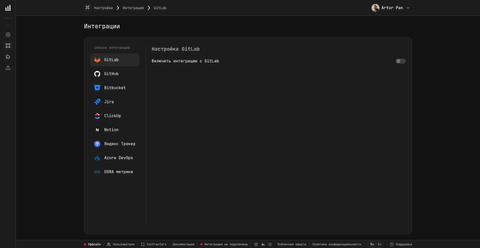
Sign in to PanDev Metrics as a workspace admin and open Settings → Integrations → GitLab.
Step 3 — Enter the GitLab URL and token
Fill in the form:
| Field | Value for GitLab.com | Value for Self-Managed |
|---|---|---|
| GitLab URL | https://gitlab.com | https://gitlab.acme.example |
| Access token | The token from Step 1 | The token from Step 1 |
Select Test connection. PanDev Metrics calls /api/v4/user on your GitLab instance and reports the authenticated username plus the count of accessible projects.
When the check passes, select Save.
Step 4 — Pick the projects to monitor
After activation, PanDev Metrics shows the list of groups and projects visible to the service account. Select the ones you want to analyse and save. PanDev Metrics starts a one-time backfill of the last 30 days of commits and merge requests.
Step 5 — Verify webhook registration
PanDev Metrics registers webhooks per project automatically. Open any selected project on GitLab and go to Settings → Webhooks. You should see a hook pointing at the PanDev Metrics ingest URL.
For reference, PanDev Metrics handles these webhook endpoints (you don't configure them by hand — GitLab posts to them via the URL written during activation):
| Event | PanDev Metrics endpoint (informational) |
|---|---|
| Repository / project lifecycle | /v1/gitlab/webhook/repository |
| Merge request events | /v1/gitlab/webhook/merge-request |
| Push events | /v1/gitlab/webhook/push |
| Aggregated v2 ingest | /v2/gitlab/webhook |
Recent deliveries should return HTTP 200 within seconds.
Verify
Open Settings → Integrations → GitLab in PanDev Metrics. You should see:
- A green Connected badge
- The count of selected projects
- The timestamp of the Last sync (no older than 30 minutes once backfill finishes)
Then open a dashboard with DORA metrics — within ~15 minutes after activation, lead-time and deployment-frequency tiles should reflect GitLab data.
Troubleshooting
Test connection returns "401 Unauthorized"
The token is invalid, revoked, or missing the api scope. Re-generate it with api and write_repository scopes (Step 1) and paste the new value.
Test connection returns "Could not resolve host"
PanDev Metrics can't reach your Self-Managed GitLab. For on-prem PanDev Metrics, check egress: docker exec pandev-metrics-app curl -v https://gitlab.acme.example. Open the firewall or set HTTPS_PROXY on the container.
Webhook deliveries show 500 from GitLab side
GitLab couldn't reach the PanDev Metrics webhook URL. For on-prem deployments, the PanDev Metrics host must be reachable from GitLab on the public URL configured under Settings → System → Public URL. Verify with curl -I <public-url>/v1/gitlab/webhook/merge-request from a machine that has GitLab's view of the network.
MR comments don't appear
Either the token lacks write_repository or Post MR comments is disabled. Open Settings → Integrations → GitLab → Advanced and confirm both. PanDev Metrics never posts to MRs in projects excluded from monitoring.
Only some projects sync
The service account doesn't have at least Reporter access to the missing projects. Add the service account at the group level so all child projects inherit access, then re-run Test connection.
What gets collected
PanDev Metrics ingests, per selected project:
- Commits (SHA, author, timestamp, message, file stats)
- Branches and tags
- Merge requests (open / merged / closed) and their reviews, comments, and approvals
- Pipeline status attached to merge requests (when present)
Source code itself is not stored. For details, see How the plugin works.
FAQ
What's the absolute minimum scope I can give the token?
api alone is enough for read-only analytics (commits, MRs, reviews). Add write_repository if you want PanDev Metrics to post DORA-metric comments on merge requests. PanDev Metrics will surface a warning if write_repository is missing but you've enabled commenting.
Does PanDev Metrics work with GitLab Self-Managed?
Yes. There's no version cutoff — any GitLab Self-Managed that exposes the v4 REST API works. Just point GitLab URL at your instance.
Should I use a personal access token or a group/project token?
For broad analytics — use a personal access token on a service account, then add that user to the relevant groups. For scoping to a single group, use a group access token; for one project, a project access token. PanDev Metrics doesn't care which kind you paste in.
How long does the initial backfill take?
PanDev Metrics backfills the last 30 days when you activate the integration. For 50 projects this typically takes 5-15 minutes. Larger fleets can take an hour. Sync after backfill is real-time via webhooks.
Can I rotate the token without re-installing?
Yes. Generate a new token in GitLab, then open Settings → Integrations → GitLab → Advanced → Update token in PanDev Metrics. Webhooks stay registered and no backfill is re-triggered.
Are GitLab CI pipelines included?
Yes. Pipeline status attached to merge requests is read via the standard GitLab API. PanDev Metrics uses this for deployment-frequency and change-failure-rate metrics.
What happens if the service account loses access to a project?
PanDev Metrics marks that project as Unreachable on the integration screen and stops syncing it. Re-add the service account on GitLab and select Test connection — PanDev Metrics resumes within minutes.
Next steps
- Connect a task tracker — link commits and MRs to Jira / Yandex Tracker / Notion
- Install the JetBrains plugin — surface PanDev Metrics inside the IDE
- Review on-prem network and ports — egress rules for self-hosted PanDev Metrics
Related
- How-to: GitHub integration
- How-to: Bitbucket integration
- How-to: Azure DevOps integration