IDE plugins overview
PanDev Metrics ships lightweight plugins for every major IDE family. Once installed, a plugin sits in the background and reports developer activity (file events, branch switches, AI prompts) to the PanDev Metrics server. There is nothing to start or stop.
This page lists every supported IDE, the install channel, and what each plugin actually captures.
Plugins page in the web app
The web app groups all integrations under Settings → Plugins. The page splits them into categories so administrators can see at a glance which channels are wired up across the tenant:
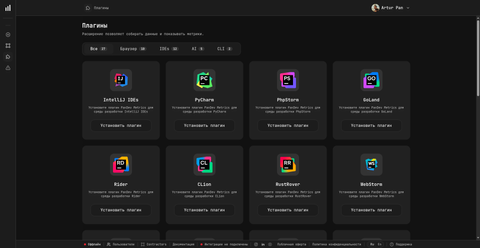
| Tab | What it contains |
|---|---|
| All | Every plugin in one list |
| Browser | The 10 browser extensions (Chrome, Edge, Firefox, Brave, Opera, Arc, Vivaldi, Yandex, Whale, Sidekick) |
| IDEs | 16 IDE integrations (JetBrains family, Visual Studio, VS Code, Xcode, Eclipse, PL/SQL Developer, DBeaver) — covered on this page |
| AI | 5 AI coding tool integrations, tracked as a separate category from regular IDE plugins so AI coding activity is visible on its own counters |
| CLI | The CLI plugin for terminals — see CLI plugin overview |
Supported IDEs
| IDE / family | Plugin source | Status | Install guide |
|---|---|---|---|
| IntelliJ IDEA | JetBrains Marketplace | Supported | JetBrains plugin |
| PyCharm | JetBrains Marketplace | Supported | JetBrains plugin |
| WebStorm | JetBrains Marketplace | Supported | JetBrains plugin |
| PhpStorm | JetBrains Marketplace | Supported | JetBrains plugin |
| GoLand | JetBrains Marketplace | Supported | JetBrains plugin |
| Rider | JetBrains Marketplace | Supported | JetBrains plugin |
| CLion | JetBrains Marketplace | Supported | JetBrains plugin |
| RustRover | JetBrains Marketplace | Supported | JetBrains plugin |
| RubyMine | JetBrains Marketplace | Supported | JetBrains plugin |
| Android Studio | JetBrains Marketplace | Supported | JetBrains plugin |
| Visual Studio (2019, 2022) | Visual Studio Marketplace | Supported | Visual Studio plugin |
| Visual Studio 2024+ | Visual Studio Marketplace | Should work, not yet tested | Visual Studio plugin |
| VS Code | VS Code Marketplace | Supported | VS Code plugin |
| Cursor | VS Code Marketplace (reused) | Supported via VS Code plugin | Cursor & Windsurf |
| Windsurf | VS Code Marketplace (reused) | Supported via VS Code plugin | Cursor & Windsurf |
| Xcode | PanDev platform (DMG) | Supported | Xcode plugin |
| Eclipse and Eclipse-based IDEs | Manual package | Supported | Contact your administrator |
| DBeaver | PanDev update site (p2) | Supported | DBeaver plugin |
There are no separate plugins for Cursor, Windsurf, or other VS Code forks. They install the standard VS Code plugin from the marketplace.
What plugins capture
| Captured | Not captured |
|---|---|
| File names you open and edit | Source code contents |
| Activity events (edits, scroll, open / close) | Screenshots |
| Branch switches | Screen recordings |
| Project name | Clipboard content |
| Time spent in each file | Keystrokes |
| AI assistant prompts (Copilot, Cursor AI, etc.) — counted as developer activity | Personal files outside the project |
| AI-generated edits — counted separately as AI activity |
All telemetry is transmitted over HTTPS / TLS.
Active time algorithm
PanDev Metrics turns raw events into "active time" with a single rule:
- If the gap between two consecutive events is less than 15 minutes, the time between them is counted as active.
- If the gap is 15 minutes or longer, that interval is treated as idle and excluded.
This is the same algorithm across every plugin (JetBrains, VS Code, Visual Studio, Xcode, Eclipse), so totals are directly comparable between IDEs.
Auto-update
| IDE family | Update model |
|---|---|
| JetBrains (all 10 IDEs) | Auto-update via JetBrains Marketplace |
| VS Code, Cursor, Windsurf | Auto-update via VS Code Marketplace |
| Visual Studio | Auto-update via Visual Studio Marketplace |
| Xcode | Manual update |
| Eclipse and Eclipse-based | Manual update |
| DBeaver | Help → Check for Updates from the PanDev update site |
We recommend running the latest plugin version. There is no hard minimum — older versions keep working, but new features and fixes only land in newer releases.
Offline behaviour
If the plugin cannot reach the PanDev Metrics server, it queues events locally. When connectivity is restored, the queue is flushed in order. You will not lose activity due to a flaky connection, a VPN drop, or working on a plane.
Connection settings
Every plugin signs in the same way: a single token per user. It is one string starting with pandev_ that already carries the server address and the workspace, so the plugin has exactly one field to fill in and nothing else to configure.
Where to get it:
- Open the web app and go to Settings → Plugins.
- Click the plugin you are installing — the install instructions open.
- Copy the value from the Enter your token step.
- Paste it into the plugin and save.
The token is issued for the workspace you are currently signed into in the web app, and each user has one active token per workspace. The same step has Rotate token (issue a new one, the old stops working at once) and Revoke token (delete without a replacement) — after either, re-paste the token into every plugin that used it.
One token covers IDE plugins, browser extensions, and the CLI, on cloud and on-prem alike.
A token is a credential. Anyone holding it can send metrics as you — treat it like a password, keep it out of commits and shared chats, and revoke it if it leaks.
AI assistants and AI editors
When you use an AI coding tool inside the IDE, PanDev Metrics splits the work into two streams:
- Developer activity — the prompts you write, the edits you accept, the time you spend reviewing AI output.
- AI activity — code generated and applied by the AI itself. Tracked on a separate counter so you can see how much of the codebase was authored by AI vs. by humans.
This works for GitHub Copilot, JetBrains AI Assistant, Cursor AI, Windsurf, and any other in-IDE assistant.
Privacy
- Source code never leaves your machine.
- No screenshots, screen recording, or keystroke logging.
- A workspace administrator can scope which projects are tracked.